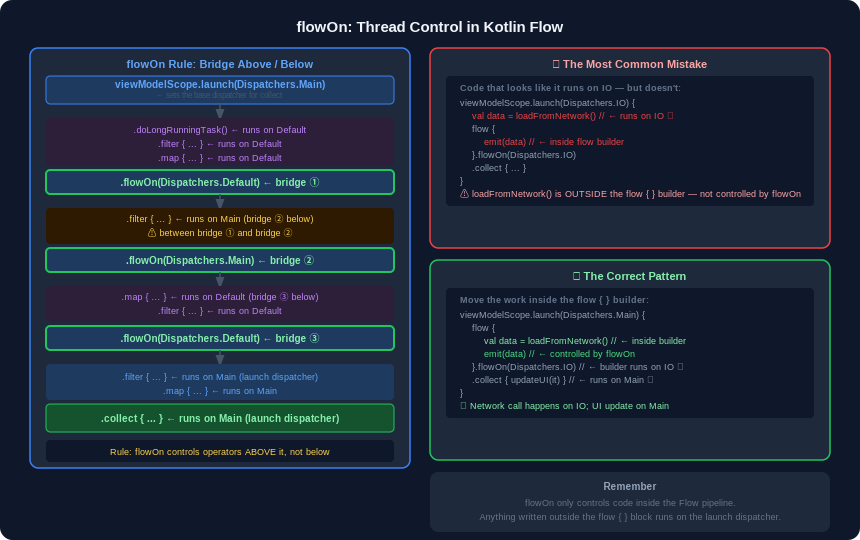
Thread control in Kotlin Flow works differently from withContext in regular coroutines. A single keyword — flowOn — controls the thread for a range of operators above it in the chain. Understanding exactly which operators are affected prevents one of the most common bugs in Flow-based Android code.
The flow Builder
Before covering flowOn, you need to know how to create a Flow that emits values:
// flow {} builder — performs work and emits
fun doLongRunningTask(): Flow<Int> = flow {
    delay(2000)        // simulate work
    emit(1)            // emit first value
    emit(2)            // emit second value
    emit(3)            // emit third value
}

// flowOf() shortcut — emits a fixed set of values immediately
val numberFlow: Flow<Int> = flowOf(1, 2, 3, 4, 5)
Inside flow { }, you do work and call emit() for each value you want to send downstream. The collect is a suspend function — that is why you must call it inside a coroutine:
lifecycleScope.launch {
    doLongRunningTask()
        .collect { value -> Log.d(TAG, "Received: $value") }
}
flowOn: The Thread Bridge
flowOn is an operator that changes the dispatcher for all operators above it in the chain. Think of it as a bridge: everything upstream of the bridge runs on the specified dispatcher; everything below runs on whatever dispatcher the launch used.
viewModelScope.launch(Dispatchers.Main) {
    doLongRunningTask()          // runs on Default ↑
        .filter { it > 0 }       // runs on Default ↑
        .map { it * 2 }          // runs on Default ↑
        .flowOn(Dispatchers.Default)   // ← bridge
        .collect { updateUI(it) }      // runs on Main (launch dispatcher)
}
The .flowOn(Dispatchers.Default) call says: “run everything above me on the Default dispatcher.” The .collect block is below the bridge, so it runs on whatever the launch scope specified — Dispatchers.Main in this case.
Multiple flowOn Bridges
You can place flowOn anywhere in the chain. Each one controls the operators immediately above it, up to the previous flowOn (or the source if there is none):
viewModelScope.launch(Dispatchers.Main) {
    doLongRunningTask()
        .filter { printThread("filter 1"); true }   // Default ①
        .map { printThread("map 1"); it * it }       // Default ①
        .flowOn(Dispatchers.Default)                 // bridge ①

        .filter { printThread("filter 2"); true }   // Main  ②
        .flowOn(Dispatchers.Main)                    // bridge ②

        .map { printThread("map 2"); it * it }       // Default ③
        .filter { printThread("filter 3"); true }   // Default ③
        .map { printThread("map 3"); it * it }       // Default ③
        .flowOn(Dispatchers.Default)                 // bridge ③

        .filter { printThread("filter 4"); true }   // Main (launch)
        .collect { printThread("collect") }          // Main (launch)
}
Reading bottom-up:
collectand the lastfilterrun onMain— no bridge between them and the launch.- Bridge ③ controls
map 3,filter 3,map 2— those run onDefault. - Bridge ② controls
filter 2— runs onMain. - Bridge ① controls
map 1,filter 1, and the source — all run onDefault.
The Rule in One Sentence
flowOncontrols the thread for all operators above it — not below.
This is the opposite of how withContext works in regular coroutines, where you wrap a block and everything inside runs on the new dispatcher. With flowOn, you place it after the operators you want to affect.
The Most Common Mistake
This mistake appears frequently in real Android projects:
viewModelScope.launch(Dispatchers.IO) {
    val data = loadFromNetwork()   // ← outside the flow builder

    flow {
        emit(data)
    }
    .flowOn(Dispatchers.IO)
    .collect { updateUI(it) }
}
It looks like loadFromNetwork() runs on IO because flowOn(Dispatchers.IO) is right there. But loadFromNetwork() is outside the flow { } builder. flowOn only controls code inside the Flow pipeline. Code outside — no matter how close it is to the chain — runs on the launch dispatcher.
In this case, loadFromNetwork() runs on Dispatchers.IO only because the launch was given Dispatchers.IO. Remove the Dispatchers.IO from launch and the network call silently moves to the main thread.
The correct pattern:
viewModelScope.launch(Dispatchers.Main) {
    flow {
        val data = loadFromNetwork()   // ← inside the builder
        emit(data)
    }
    .flowOn(Dispatchers.IO)            // ← controls the builder above ✅
    .collect { updateUI(it) }          // ← runs on Main ✅
}
Now loadFromNetwork() is genuinely controlled by flowOn. Move it inside the builder, and the dispatcher controls it reliably.
A Practical Interview Question
The class notes include this exact question:
viewModelScope.launch(Dispatchers.Main) {
    Log.d(TAG, "log outside flow")   // which thread?

    flow {
        emit(loadData())
    }
    .flowOn(Dispatchers.Default)
    .collect { Log.d(TAG, "collect") }
}- “log outside flow” → runs on
Main(the launch dispatcher). It is outside the pipeline entirely. loadData()inside the builder → runs onDefault(controlled byflowOn).collect→ runs onMain(the launch dispatcher, below the bridge).
Anything outside the flow { } block is invisible to flowOn.
Summary
| Position in chain | Thread |
|---|---|
Inside flow { } builder | Controlled by flowOn above it (if present) |
Operators above a flowOn | Run on the dispatcher specified by that flowOn |
Operators below a flowOn | Run on the next flowOn below, or the launch dispatcher |
.collect { } | Runs on the launch dispatcher |
Code outside flow { } | Runs on the launch dispatcher — flowOn has no effect |
The next post covers map vs flatMapConcat — how to handle the case where your transformation itself performs a network call or database query and returns a Flow.