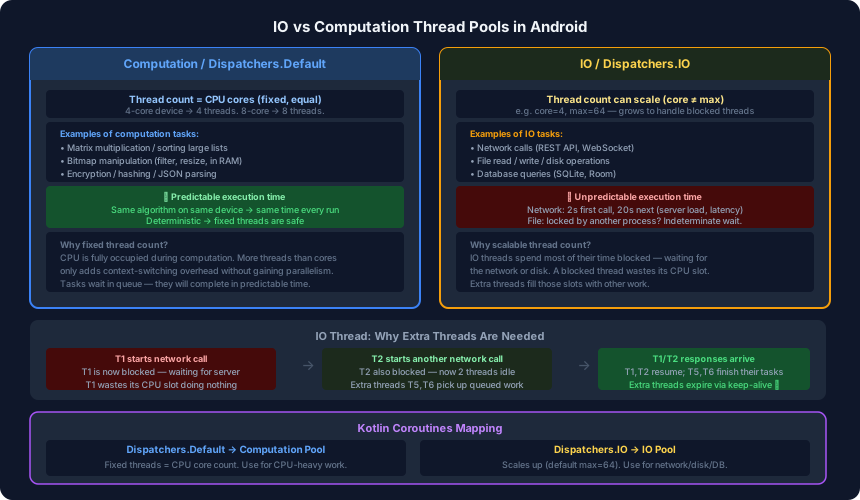
Every async framework in Android — RxJava, Kotlin Coroutines, even the older AsyncTask — exposes two named thread pools: one for IO work and one for computation. They are not interchangeable. Using the wrong one wastes resources or degrades performance. Understanding the difference requires understanding two types of tasks.
The Core Distinction: Predictable vs Unpredictable
Computation tasks have a property that IO tasks do not: their execution time is knowable in advance, for a given device and dataset.
Matrix multiplication on a Samsung S8 with a 1000×1000 matrix takes roughly the same time every run — maybe 2 seconds. Run it again tomorrow — still 2 seconds. The algorithm is deterministic. The CPU is doing real work the entire time.
IO tasks depend on systems outside your control.
A network call might take 200 ms on a good connection or 20 seconds on a weak one. A file write might be instant or stall because another process has a lock on the file. A database query depends on what else is reading the same tables. You cannot predict the duration of any individual IO operation.
This single difference — predictable vs unpredictable — drives the entire design of the two pools.
The Computation Pool
Because computation tasks are predictable, you can size the pool precisely. The right number of computation threads is the number of CPU cores.
On a quad-core device, 4 threads can each occupy a core and run in true parallel. A 5th thread would have to wait for a core — it adds no parallelism, only context-switching overhead (see the previous post).
// Kotlin Coroutines — Dispatchers.Default uses the Computation pool
withContext(Dispatchers.Default) {
    val sorted = hugeList.sortedBy { it.score }  // CPU-bound
}
Dispatchers.Default thread count = number of CPU cores. It is fixed. Tasks that arrive while all cores are busy wait in a queue. They will get their turn in predictable time because computation tasks do not block for external reasons.
Good fits for Dispatchers.Default:
- Sorting or filtering large in-memory collections
- Bitmap manipulation (resize, colour filter, histogram)
- Encryption, hashing, compression
- Any tight loop or algorithm that keeps the CPU busy throughout
The IO Pool
IO tasks have an extra behaviour that changes everything: they block. While a thread is waiting for a network response, it is not executing any code. It is suspended in the OS, occupying a thread slot while contributing zero CPU work.
On a quad-core device with a 4-thread pool, two blocked IO threads cut your available throughput in half. Four blocked IO threads bring the pool to a standstill, even though the CPU is completely idle.
The solution is to allow the IO pool to scale. When threads are blocked, create more threads to absorb the queued work:
// Kotlin Coroutines — Dispatchers.IO uses the IO pool (scales up to 64 by default)
withContext(Dispatchers.IO) {
    val response = apiService.getUser(userId)  // network call — may block
}
Dispatchers.IO starts with a smaller core count and expands up to 64 threads (the Kotlin default). Extra threads cover for blocked ones. When the IO operations complete and threads are no longer blocked, extra threads expire via keep-alive.
Good fits for Dispatchers.IO:
- Network calls (Retrofit, OkHttp, Ktor)
- File reads and writes
- Room database queries
- SharedPreferences or any disk-backed storage
What Happens When You Use the Wrong One
Computation task on IO pool: The task still runs correctly, but you may trigger unnecessary thread creation. The IO pool sees a thread “busy” (it never blocks) and may spin up extras unnecessarily, wasting memory.
IO task on Computation pool: The thread blocks. Other computation tasks queue up waiting for that thread, even though the CPU is idle. With enough blocked threads, the computation pool stalls entirely. This is the more dangerous mistake — it can silently degrade performance under load.
// Wrong — blocks the computation pool waiting for network
withContext(Dispatchers.Default) {
    val response = httpClient.get(url)  // ❌
}

// Correct
withContext(Dispatchers.IO) {
    val response = httpClient.get(url)  // ✅
}
How Frameworks Wire This Up
Every major async framework in Android uses this same two-pool model internally:
| Framework | Computation pool | IO pool |
|---|---|---|
| Kotlin Coroutines | Dispatchers.Default | Dispatchers.IO |
| RxJava | Schedulers.computation() | Schedulers.io() |
| Executors (Java) | newFixedThreadPool(nCores) | newCachedThreadPool() |
The names differ but the concepts are identical. Schedulers.computation() in RxJava and Dispatchers.Default in coroutines both use a fixed pool sized to CPU core count. Schedulers.io() and Dispatchers.IO both use a scalable pool.
Practical Rule
When deciding which dispatcher to use, ask one question: does this task wait for something outside the CPU?
- Waiting for a network response →
Dispatchers.IO - Waiting for a file lock →
Dispatchers.IO - Waiting for a DB query →
Dispatchers.IO - Fully in-memory work, no external waits →
Dispatchers.Default
If the task downloads a file and then processes its bytes:
launch {
    val bytes = withContext(Dispatchers.IO) { downloadFile(url) }      // network wait
    val bitmap = withContext(Dispatchers.IO) { decodeBitmap(bytes) }   // disk read
    val filtered = withContext(Dispatchers.Default) { applyFilter(bitmap) } // CPU work
}
Switch dispatchers within the same coroutine as the nature of work changes. withContext does not start a new coroutine — it just moves the current one to a different thread pool for that section of work.
Summary
| Computation | IO | |
|---|---|---|
| Thread count | Fixed = CPU cores | Scalable, up to 64 |
| Task behaviour | CPU-busy throughout | Blocks waiting on external systems |
| Execution time | Predictable | Unpredictable |
| Kotlin dispatcher | Dispatchers.Default | Dispatchers.IO |
| Wrong usage risk | IO tasks stall it | Low — just slightly over-threads |
The next post goes deeper into how Kotlin Coroutines work internally — why you can launch 100,000 coroutines without running out of memory, and how suspend functions map to thread pool operations under the hood.