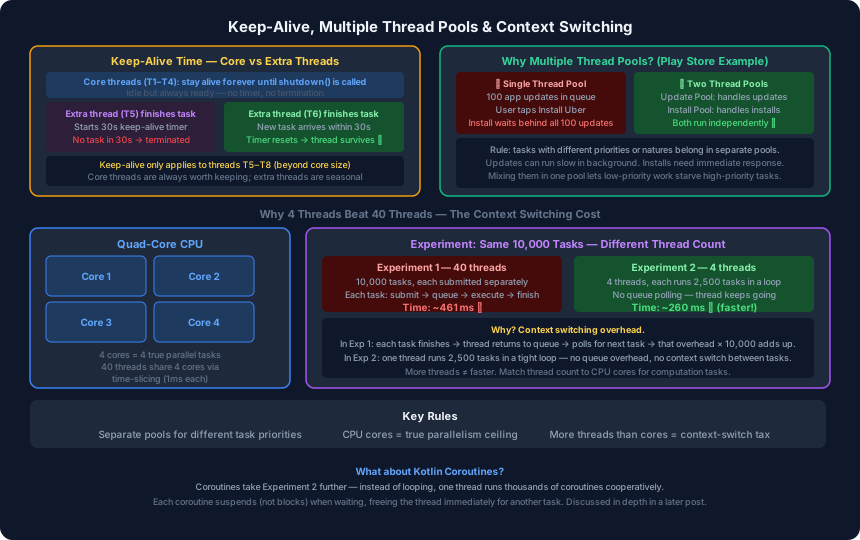
The previous post covered how a thread pool is structured — core size, max size, queue capacity, and rejection. This post covers what happens to threads that finish early, why you sometimes need more than one pool, and why adding more threads to a pool can actually slow things down.
Keep-Alive Time: Seasonal Threads
A thread pool distinguishes between two categories of threads:
Core threads are the permanent workforce. They were created during warmup and stay alive indefinitely. Even when idle — waiting with nothing to do — they are never terminated. The pool owns them until you call threadPool.shutdown().
Extra threads are the surge capacity. They exist only because the queue filled up and there was more work than the core threads could absorb. Once the surge passes and these threads have been idle long enough, they are terminated and their memory is reclaimed.
Keep-alive time is the idle threshold for that termination:
val threadPool = ThreadPoolExecutor(
    4,                       // core — T1-T4, stay forever
    8,                       // max — T5-T8, created when queue overflows
    30L, TimeUnit.SECONDS,   // keep-alive: T5-T8 die after 30s idle
    LinkedBlockingQueue(10)
)
When Thread 5 finishes its task and the queue is empty, a 30-second countdown starts. If a new task arrives within that window, the countdown resets and Thread 5 handles it. If not, Thread 5 is destroyed.
Core threads T1–T4 never see this timer. They are always ready.
Core threads (T1–T4)   → idle indefinitely → alive until shutdown()
Extra threads (T5–T8)  → idle 30 seconds   → terminated, memory freed
Why Multiple Thread Pools Improve UX
A single thread pool treats all tasks equally. Tasks are served in the order they arrived, regardless of their importance to the user. This causes problems when low-priority background work competes with high-priority user-facing work.
Play Store Example
When you tap “Update All” in the Play Store, 100 app updates are queued. Say the pool has 4 threads. They start downloading and installing updates.
Now you tap “Install” on a new app — Uber. Where does that install task go?
With a single thread pool: Uber joins the back of the queue behind all 100 updates. You stare at a loading indicator while WhatsApp and Instagram update in the background. This is a terrible user experience.
With two separate thread pools:
val updatePool = ThreadPoolExecutor(4, 4, 0L, TimeUnit.SECONDS,
    LinkedBlockingQueue(200))   // handles background updates

val installPool = ThreadPoolExecutor(2, 4, 30L, TimeUnit.SECONDS,
    LinkedBlockingQueue(10))    // handles immediate installs
The install task goes directly into installPool. Updates and installs run independently. The user sees progress on Uber immediately, regardless of how many updates are running.
The rule: separate pools for tasks with different priorities or natures. Updates can tolerate queuing. User-initiated installs cannot.
CPU Cores and Context Switching
Before addressing the counterintuitive experiment, it helps to understand what a CPU core actually does with threads.
A quad-core device has four execution units that can each process one thread simultaneously. If you have four threads and four cores, you have true parallelism — all four tasks run at exactly the same moment.
If you have forty threads and four cores, you have the illusion of parallelism. The OS scheduler gives each thread a tiny time slice — roughly 1 millisecond — then switches to the next thread. The switching happens so fast that it feels continuous, but every switch has a cost:
- Save the outgoing thread’s registers and state
- Load the incoming thread’s registers and state
- Resume execution
This overhead is called context switching. It is small per switch, but it compounds quickly with many threads.
The Experiment: 4 Threads vs 40 Threads
This was tested with a real Android app running 10,000 identical computation tasks:
Experiment 1 — 40 threads:
val threadPool = Executors.newFixedThreadPool(40)
repeat(10_000) {
    threadPool.execute {
        longRunningTask()   // same task, 10k submissions
    }
}
Each task is submitted separately. A thread picks it up, executes it, marks it complete, then goes back to the queue to pick up the next one. That queue polling happens 10,000 times.
Result: ~461 ms
Experiment 2 — 4 threads:
val threadPool = Executors.newFixedThreadPool(4)
repeat(4) {
    threadPool.execute {
        repeat(2_500) {
            longRunningTask()   // same task, run 2500x in a tight loop
        }
    }
}
Only 4 tasks are submitted. Each thread runs its task 2,500 times in a loop without ever returning to the queue. Same total work — 10,000 executions.
Result: ~260 ms
Experiment 2 was faster — even with ten times fewer threads.
Why Fewer Threads Won
In Experiment 1, each of the 10,000 tasks went through this lifecycle:
- Submit task to queue
- Thread picks task from queue (queue polling overhead)
- Execute task
- Return to queue for next task
- Repeat
That queue roundtrip happened 10,000 times. Multiplied across 40 threads context-switching on 4 cores, the overhead accumulated to ~461 ms.
In Experiment 2, each thread ran in a tight loop:
- Execute task
- Execute task
- Execute task
- …2,500 times…
No queue polling. No context switching between tasks within a thread. The 4 threads matched the 4 CPU cores — real parallelism without scheduling overhead.
The lesson: thread count should be matched to CPU cores for computation work. Adding more threads does not add more capacity beyond the number of cores. It only adds context-switching overhead.
The Right Thread Count
| Task type | Appropriate thread count |
|---|---|
| Computation (CPU-bound) | Equal to CPU core count |
| IO (network, disk, DB) | Higher than core count — threads spend time waiting, not computing |
Computation tasks fully occupy a core while running. IO tasks sit blocked waiting for a response, so extra threads can fill in the idle time.
The next post covers exactly this distinction — why Android and Kotlin expose separate IO and Computation thread pools, and what it means for Dispatchers.IO and Dispatchers.Default.