Every Android app has a memory budget — typically around 256 MB on a modern device. Threads eat into that budget at a flat rate. Understanding how a thread pool controls that cost is one of the most practical pieces of concurrency knowledge you can carry.
Why Unlimited Threads Are a Bad Idea
When an app needs to handle multiple tasks at the same time, the naive approach is to create one thread per task:
// One thread per task — works until it doesn't
tasks.forEach { task ->
    Thread { task.execute() }.start()
}
This creates two serious problems as the number of tasks grows:
Memory overhead. Each thread reserves roughly 512 KB of stack memory on Android. 100 threads = 50 MB. 1 000 threads = 500 MB. Most apps never get a 500 MB allocation.
Creation overhead. A Thread is not a lightweight object. Constructing one takes real CPU time — allocating the stack, registering it with the OS scheduler, initialising internal state. Doing this thousands of times per minute is expensive.
The solution is to create threads once, reuse them across many tasks, and cap the total count. That is exactly what a Thread Pool does.
The Thread Pool Mental Model
A thread pool has two moving parts:
- A fixed set of threads that are created once and kept alive.
- A task queue where incoming tasks wait until a thread is free.
When a task arrives, the pool assigns it to an idle thread immediately. If all threads are busy, the task waits in the queue. When a thread finishes its current task, it picks the next one from the queue. No new threads are created. No threads are destroyed between tasks. The same four threads process all ten thousand tasks.
ThreadPoolExecutor: The Four Parameters
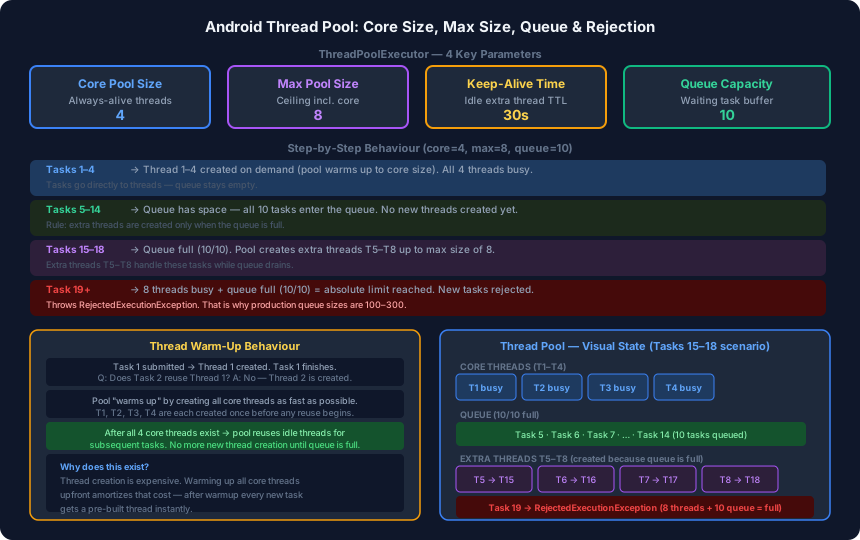
Android’s ThreadPoolExecutor is configured with four values:
val threadPool = ThreadPoolExecutor(
    4,                          // corePoolSize
    8,                          // maximumPoolSize
    30L,                        // keepAliveTime
    TimeUnit.SECONDS,
    LinkedBlockingQueue(10)     // workQueue capacity
)
Core Pool Size
The number of threads that are always maintained, even when idle. These threads are created on demand as tasks arrive and are never terminated until you explicitly call threadPool.shutdown().
Maximum Pool Size
The absolute ceiling on the number of threads. Extra threads beyond the core count are created only under a specific condition — and that condition is not “the threads are busy.” It is “the queue is full.”
Keep-Alive Time
How long an extra thread (one beyond the core count) may remain idle before being terminated. Applies only to threads T5 through T8 in our example. Core threads T1–T4 ignore this completely.
Queue Capacity
The maximum number of tasks that can wait in line. In production code this is usually 100–300. A small value like 10 is used here only to make rejection scenarios visible.
Step-by-Step Behaviour (core=4, max=8, queue=10)
Walk through what actually happens as tasks accumulate:
| Tasks submitted | What happens |
|---|---|
| 1–4 | T1–T4 created on demand. Each task runs immediately. Queue stays empty. |
| 5–14 | All 4 threads busy. Queue has space. Tasks 5–14 wait in the queue. No new threads. |
| 15–18 | Queue is now full (10/10). Pool creates T5–T8 up to max size. Tasks 15–18 run on extra threads. |
| 19+ | 8 threads busy + queue full. Limit exceeded. RejectedExecutionException is thrown. |
The rule that surprises most developers: new threads are not created when the core threads are busy. They are created when the queue overflows.
Thread Warm-Up: Why Reuse Doesn’t Start Immediately
There is a subtle behaviour at pool startup. Suppose you submit Task 1 and it finishes quickly. When Task 2 arrives, you might expect Thread 1 to be reused — it is idle and ready. Instead, Thread 2 gets created.
This continues for Tasks 3 and 4. Only once all four core threads exist does the pool start reusing them.
Task 1 → creates Thread 1
Task 1 finishes → Thread 1 is free
Task 2 → creates Thread 2 (not reusing Thread 1!)
Task 2 finishes → Thread 2 is free
Task 3 → creates Thread 3
Task 4 → creates Thread 4
Task 5 → reuses whichever thread finished first ✅
The pool prioritises reaching its core size as quickly as possible. Thread creation is expensive, so the pool amortises that cost upfront. After warmup, every subsequent task gets a pre-built thread with zero creation cost.
Keep-Alive: The Difference Between Core and Extra Threads
Once the workload drops and the extra threads (T5–T8) become idle, the keep-alive timer starts. If no new task arrives within 30 seconds, each extra thread is terminated and its memory is released.
Core threads T1–T4 are never touched by the keep-alive timer. They sit idle indefinitely, ready for the next burst of work.
Core threads (T1–T4)    → idle forever, stay alive until shutdown()
Extra threads (T5–T8)   → idle for 30 s → terminated and memory freed
This asymmetry is intentional. Core threads are cheap to keep alive (idle threads use almost no CPU). Extra threads were created to handle a spike and can be discarded when the spike passes.
RejectedExecutionException: Why Queue Size Matters
When the pool reaches its absolute limit — all max threads busy and the queue completely full — it has nowhere to put the next task. The default policy is to throw RejectedExecutionException.
This is why real-world thread pools are configured with large queues (100–300 tasks), not 10. The goal is to absorb reasonable bursts of work without ever reaching rejection.
You can also provide a custom RejectedExecutionHandler to define what happens instead of throwing:
val threadPool = ThreadPoolExecutor(
    4, 8, 30L, TimeUnit.SECONDS,
    LinkedBlockingQueue(200),
    ThreadPoolExecutor.CallerRunsPolicy() // run rejected task on the calling thread
)
The four built-in policies are AbortPolicy (throw, the default), CallerRunsPolicy (run on calling thread), DiscardPolicy (silently drop), and DiscardOldestPolicy (drop the oldest queued task).
Summary
| Concept | Behaviour |
|---|---|
| Core threads | Created on demand up to core size, never terminated |
| Extra threads | Created only when queue is full, terminated after idle keep-alive time |
| Queue | Absorbs tasks when all core threads are busy |
| Rejection | Thrown when queue + max threads are both full |
| Warm-up | All core threads created first before any reuse begins |
The next post covers keep-alive time in depth, why multiple thread pools improve UX, and why 4 threads can outperform 40 — the counterintuitive result of context switching overhead.