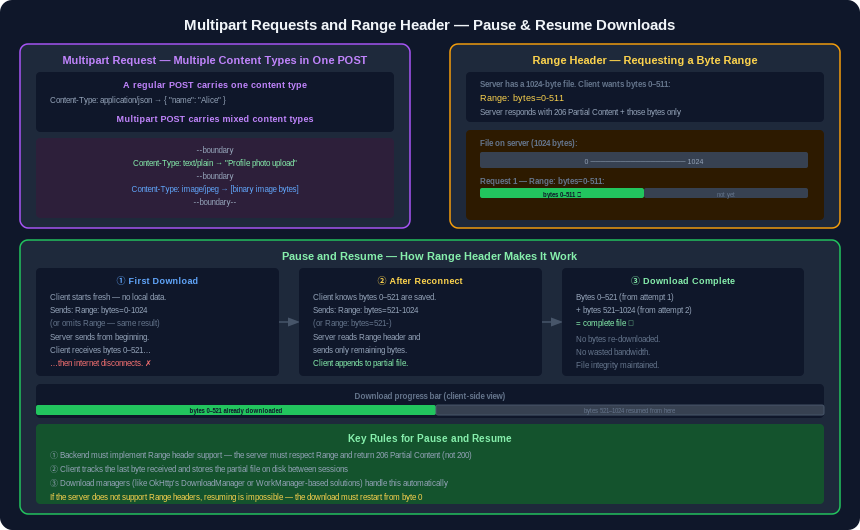
Two HTTP features power common Android app behaviours that most users take for granted: multipart requests for sending a file alongside metadata in one call, and the Range header that makes download managers resumable instead of forcing a restart from scratch after every disconnection.
Multipart Requests
A regular POST request carries a single content type in its body:
Content-Type: application/json
Body: { "name": "Alice", "age": 30 }
A multipart request carries multiple content types in the same body, each separated by a boundary string:
Content-Type: multipart/form-data; boundary=----boundary

------boundary
Content-Disposition: form-data; name="description"
Content-Type: text/plain

Profile photo upload

------boundary
Content-Disposition: form-data; name="file"; filename="photo.jpg"
Content-Type: image/jpeg

[binary image bytes]

------boundary--
Each section is a “part” with its own Content-Type. The server reads the boundary to split them apart and processes each part independently.
When to Use Multipart
Use multipart whenever a single request must carry mixed content — typically metadata alongside a binary file:
- Uploading a profile photo with a display name
- Submitting a document with form fields (title, tags, description)
- Sending an audio clip with caption text
Without multipart, you would need two separate requests: one to upload the file (getting back a URL) and one to submit the metadata with that URL. Multipart combines them into a single round trip.
Multipart with Retrofit
@Multipart
@POST("users/{id}/photo")
suspend fun uploadPhoto(
    @Path("id") userId: Int,
    @Part("description") description: RequestBody,
    @Part photo: MultipartBody.Part
): Response<UploadResult>
val descriptionBody = "Profile photo".toRequestBody("text/plain".toMediaType())
val photoBytes = photoFile.readBytes().toRequestBody("image/jpeg".toMediaType())
val photoPart = MultipartBody.Part.createFormData("photo", photoFile.name, photoBytes)
apiService.uploadPhoto(userId, descriptionBody, photoPart)The @Multipart annotation tells Retrofit to encode the request as multipart/form-data. Each @Part becomes one section in the body.
Range Header — Requesting a Specific Byte Range
The Range header lets a client request a specific portion of a file rather than downloading it from the beginning every time. This is the mechanism behind every download manager with pause and resume support.
Range: bytes=0-1023This tells the server: “Send me bytes from position 0 to position 1023.” The server responds with 206 Partial Content (not 200 OK) and the specified byte slice.
How Pause and Resume Works
Consider a 1024-byte file on the server. The client starts downloading it.
First Download — Starting Fresh
The client has nothing locally yet. It sends either no Range header (the server defaults to sending from the beginning) or an explicit:
Range: bytes=0-1024The server begins streaming the file. The client saves bytes as they arrive. After receiving 521 bytes — the internet disconnects.
The client now has a partial file: bytes 0 through 520. It records this position (521 is the next byte needed).
Resuming — Second Request
When the connection is restored, the client does not start over. It sends:
Range: bytes=521-1024Or equivalently (open-ended — “give me everything from 521 onwards”):
Range: bytes=521-The server reads the Range header and streams bytes starting at position 521. The client appends the new bytes to the partial file already on disk.
Result — Complete File Without Re-downloading
Bytes 0–520 from the first attempt + bytes 521–1024 from the second attempt = the complete 1024-byte file. Not a single byte was downloaded twice.
Requirements for Pause and Resume
Backend must support Range headers. The server must:
- Accept the
Rangerequest header. - Return
206 Partial Content(not200 OK) when serving a partial response. - Include
Content-Range: bytes 521-1024/1024in the response headers so the client knows what it received.
If the server returns 200 OK ignoring the Range header, the response contains the entire file from the beginning. The client has no choice but to discard the partial file and restart.
Client must track the last byte received. The client saves the partial file to disk between sessions and records how many bytes were successfully written. On resume, it reads that number to construct the correct Range header.
// Track progress in SharedPreferences or a database
val bytesDownloaded = prefs.getLong("downloaded_bytes", 0L)

// Build the resume request
val request = Request.Builder()
    .url(fileUrl)
    .addHeader("Range", "bytes=$bytesDownloaded-")
    .build()
Open-ended range is preferred for the final segment. Using bytes=521- instead of bytes=521-1024 is safer — the client does not need to know the total file size to construct the header. It simply asks for everything from the last known position onwards.
Pause and Resume in Practice
Most Android download libraries handle Range headers transparently:
- OkHttp — you build the Range header manually, as shown above.
- WorkManager + OkHttp — a common pattern for resumable background downloads that survive process death.
- DownloadManager (system API) — handles Range headers automatically; supports pause/resume out of the box for servers that return
Accept-Ranges: bytes.
The key insight: pause and resume is a contract between client and server. The client tracks position; the server respects the Range header. Neither side can implement it alone.
Summary
| Feature | Key point |
|---|---|
| Multipart | POST with multiple Content-Type parts — text + binary in one request |
| Range header | Range: bytes=521- — request a specific byte slice of a file |
| 206 Partial Content | Server response code confirming a range was served |
| Pause and resume | Client stores partial file + last byte position, resumes with Range header |
| Server requirement | Must support Range and respond with 206 — not all servers do |