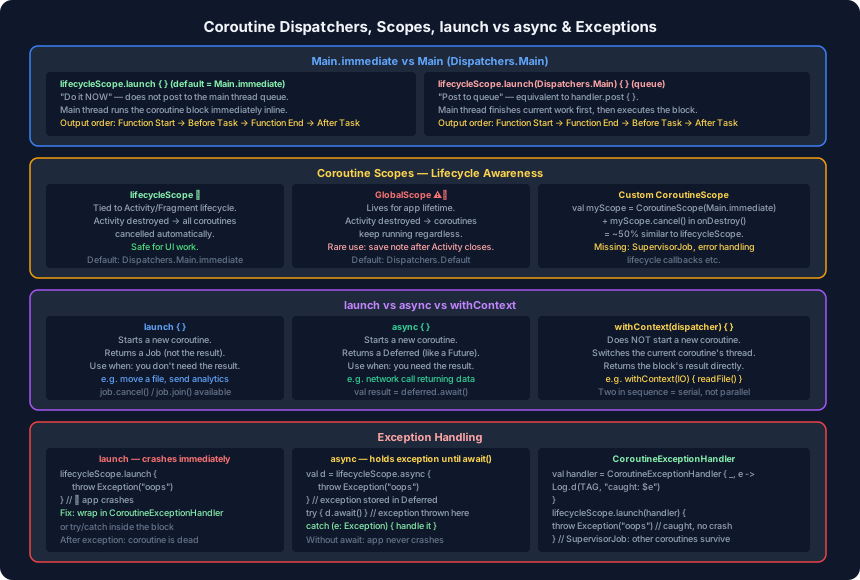
The previous post covered how coroutines work internally — the Continuation interface, CPS, and why coroutines do not run out of memory. This post covers the practical side: which dispatcher to use, which scope is appropriate, when to choose launch over async, and what happens when something throws.
Main.immediate vs Main: A Subtle but Important Difference
When you write lifecycleScope.launch { } without specifying a dispatcher, the default is Dispatchers.Main.immediate. When you write lifecycleScope.launch(Dispatchers.Main) { } explicitly, you get plain Main. These are not the same.
Main.immediate — “do it now.” The coroutine body runs on the main thread without posting to the message queue. If the calling code is already on the main thread, execution continues inline.
fun testCoroutine() {
    Log.d(TAG, "Function Start")
    lifecycleScope.launch {                     // Main.immediate (default)
        Log.d(TAG, "Before Task")
        doLongRunningTask()                     // switches to Default internally
        Log.d(TAG, "After Task")
    }
    Log.d(TAG, "Function End")
}
Output: Function Start → Before Task → Function End → After Task
Because Main.immediate runs inline, Before Task prints before Function End.
Main (queue) — “post to the main thread queue.” Equivalent to handler.post { }. The current code finishes first, then the coroutine block is picked up from the queue.
fun testCoroutineWithMain() {
    Log.d(TAG, "Function Start")
    lifecycleScope.launch(Dispatchers.Main) {  // queued
        Log.d(TAG, "Before Task")
        doLongRunningTask()
        Log.d(TAG, "After Task")
    }
    Log.d(TAG, "Function End")
}
Output: Function Start → Function End → Before Task → After Task
The coroutine is posted to the queue. Function End runs first because the current call completes before the queue is processed. In most real code Dispatchers.Main is the correct choice — the slight delay is intentional and prevents blocking UI rendering.
Coroutine Scopes: Who Owns the Lifetime?
A coroutine scope determines when coroutines are cancelled. Choosing the wrong scope is one of the most common sources of memory leaks and unexpected behaviour in Android.
lifecycleScope
Tied to an Activity or Fragment. When the component is destroyed, all coroutines launched in that scope are automatically cancelled.
lifecycleScope.launch {
    delay(5000)
    Log.d(TAG, "After delay")  // not printed if Activity destroyed in < 5s
}
This is the correct default for UI work. You never need to cancel it manually.
GlobalScope
Lives for the entire application lifetime. Activity destruction has no effect — coroutines keep running.
GlobalScope.launch {
    delay(5000)
    Log.d(TAG, "After delay")  // always printed, even if Activity is gone
}
Rarely useful in Android. One legitimate case: persisting user data after the Activity closes (e.g. autosaving a draft note). Even then, a custom scope at the ViewModel or Application level is usually preferable.
Custom CoroutineScope
You can create your own scope and cancel it manually:
private val myActivityScope = CoroutineScope(Dispatchers.Main.immediate)

override fun onDestroy() {
    super.onDestroy()
    myActivityScope.cancel()
}
With the cancel call in onDestroy, this behaves similarly to lifecycleScope — but only about 50% of the way there. lifecycleScope also wires up a SupervisorJob, registers lifecycle observers, and handles edge cases around configuration changes. The custom scope above is manual infrastructure in comparison.
launch vs async vs withContext
These three builders are frequently confused in interviews. They serve distinct purposes.
launch
Starts a new coroutine and returns a Job. Use it when you want to perform a task but do not need its return value.
val job = lifecycleScope.launch(Dispatchers.Default) {
    moveFileToArchive(file)   // fire and forget
}

job.cancel()   // cancellable
job.join()     // wait for completion without a result
launch does not “return nothing” — that is a common misconception. It returns a Job you can use to cancel or observe the coroutine.
async
Starts a new coroutine and returns a Deferred<T> — a future-like object that will eventually hold a result. Use it when the task produces a value you need.
val deferredOne = async { doLongRunningTaskOne() }  // starts immediately
val deferredTwo = async { doLongRunningTaskTwo() }  // starts immediately, in parallel

val result = deferredOne.await() + deferredTwo.await()  // wait for both
An important detail: the async block starts executing immediately when you call async. The .await() call does not trigger execution — it only waits for the result. Two async blocks started back-to-back run in parallel.
Contrast with two sequential withContext calls, which run in series:
// 4 seconds total — series
val r1 = withContext(Dispatchers.Default) { taskOne() }   // 2s
val r2 = withContext(Dispatchers.Default) { taskTwo() }   // 2s, starts after r1

// 2 seconds total — parallel
val d1 = async { taskOne() }
val d2 = async { taskTwo() }
val result = d1.await() + d2.await()
withContext
Does not start a new coroutine. It moves the current coroutine to a different dispatcher for the duration of the block, then moves it back.
lifecycleScope.launch {
    val bytes = withContext(Dispatchers.IO) { downloadFile(url) }
    val bitmap = withContext(Dispatchers.IO) { decodeFromBytes(bytes) }
    val filtered = withContext(Dispatchers.Default) { applyFilter(bitmap) }
    imageView.setImageBitmap(filtered)   // back on Main
}
No extra coroutines created — just thread switching within one coroutine. This is the correct pattern for chaining IO and computation steps.
Job Cancellation
launch returns a Job. Calling cancel() on it stops the coroutine at its next suspension point.
val job = lifecycleScope.launch(Dispatchers.Main) {
    Log.d(TAG, "Before Task 1")
    doLongRunningTask()
    Log.d(TAG, "After Task 1")
}

lifecycleScope.launch(Dispatchers.Main) {
    Log.d(TAG, "Before Task 2")
    job.cancel()                        // cancels the first coroutine
    doLongRunningTask()
    Log.d(TAG, "After Task 2")
}
After Task 1 will not print because the job was cancelled before doLongRunningTask() resumed. Cancellation is cooperative — the coroutine is stopped at its next suspend point, not mid-instruction.
Exception Handling
launch and async handle exceptions differently, and the difference matters.
launch — exception propagates immediately
lifecycleScope.launch {
    doSomething()
    throw Exception("Something went wrong")
    Log.d(TAG, "After Task")   // never reached
}
The exception propagates up to the scope. If unhandled, it crashes the app.
Fix: CoroutineExceptionHandler
val handler = CoroutineExceptionHandler { _, exception ->
    Log.d(TAG, "Caught: $exception")
}

lifecycleScope.launch(handler) {
    throw Exception("Something went wrong")  // caught by handler, no crash
}
async — exception held in the Deferred
val deferred = lifecycleScope.async {
    throw Exception("Something went wrong")
    return@async 10
}
// No crash yet — exception is stored in the Deferred object
The exception surfaces only when you call .await():
lifecycleScope.launch {
    try {
        val result = deferred.await()
    } catch (e: Exception) {
        Log.d(TAG, "Caught from async: $e")
    }
}
If you never call .await(), the exception is silently swallowed — which can hide real bugs. Always handle the result of an async block.
SupervisorJob
lifecycleScope uses a SupervisorJob internally. This means if one coroutine launched within it throws an unhandled exception, the other coroutines in the same scope are not affected. A custom CoroutineScope with a plain Job will cancel all sibling coroutines when one fails.
Summary
launch | async | withContext | |
|---|---|---|---|
| Starts new coroutine? | Yes | Yes | No |
| Returns | Job | Deferred<T> | Result directly |
| Parallel execution | Yes (if separate) | Yes (if separate) | No — serial |
| Exception | Propagates immediately | Held until await() | |
| Use when | No result needed | Result needed | Thread switch only |
| Scope | Lifetime | Auto-cancel |
|---|---|---|
lifecycleScope | Activity/Fragment | Yes — on destroy |
GlobalScope | App lifetime | No |
Custom CoroutineScope | Manual | Only if cancel() called |