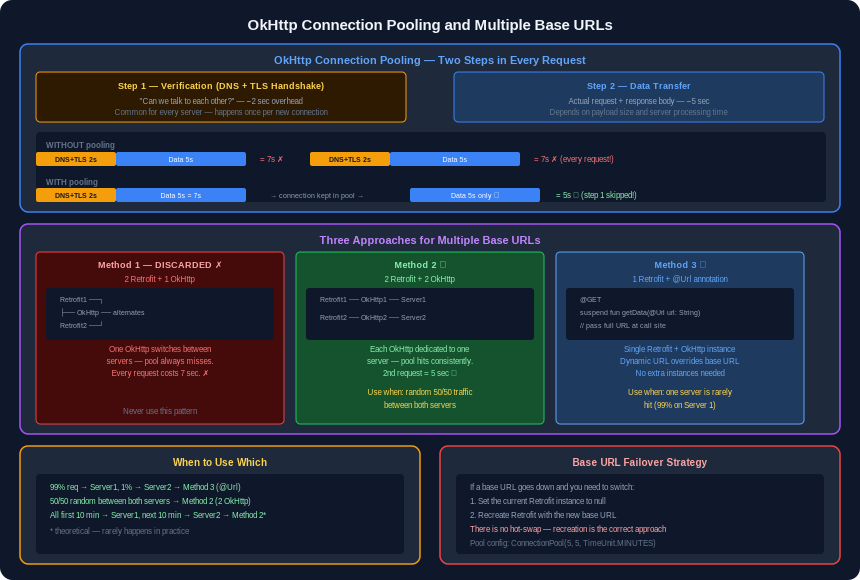
Every HTTP request over HTTPS has two distinct steps before a single byte of your data moves. Understanding those steps explains why connection pooling exists, why it matters for performance, and why the number of OkHttp instances you create for a multi-server app is not an arbitrary decision.
Two Steps in Every HTTPS Request
Step 1 — Verification (DNS resolution + TLS handshake)
Before any data flows, the client and server must establish that they can communicate securely. This involves resolving the domain name to an IP address (DNS) and negotiating an encrypted channel (TLS handshake). This step takes roughly 2 seconds on a typical mobile connection and is completely independent of how large your payload is.
Step 2 — Data Transfer
Once the connection is established, the request and response travel over it. The time here depends on your payload size and server processing time — say 5 seconds for a typical API call.
Without connection reuse: every request costs 2 + 5 = 7 seconds.
OkHttp Connection Pooling
After a request completes, OkHttp does not immediately close the connection. It keeps the socket alive in a connection pool. When the next request targets the same server, OkHttp pulls the existing connection out of the pool — step 1 is skipped entirely.
val client = OkHttpClient.Builder()
    .connectionPool(ConnectionPool(5, 5, TimeUnit.MINUTES))
.build()5— maximum number of idle connections kept in the pool.5, TimeUnit.MINUTES— how long an idle connection is kept alive before being closed.
With pooling: the first request costs 7 seconds. Every subsequent request to the same server costs 5 seconds (data transfer only). On a busy screen making 10 API calls, that is 20 seconds saved.
The pool is keyed by server host. A connection pooled for api1.example.com cannot be reused for api2.example.com — they are different servers requiring their own handshakes.
Retrofit with Multiple Base URLs — Three Approaches
Once two base URLs are involved, the connection pool behaviour becomes the deciding factor for which architecture to choose.
Method 1 — Two Retrofit Instances, One OkHttp (Discarded)
// Shared OkHttpClient
val okHttp = OkHttpClient.Builder().build()

val retrofit1 = Retrofit.Builder().baseUrl(SERVER1_URL).client(okHttp).build()
val retrofit2 = Retrofit.Builder().baseUrl(SERVER2_URL).client(okHttp).build()
This looks economical — one OkHttp for both Retrofit instances. In practice it defeats the pool.
When requests alternate between servers (Server1, Server2, Server1, Server2…), the single OkHttp closes and reopens connections on every switch. The pool holds a connection for Server1, then replaces it with a Server2 connection, then replaces it again. Every request costs the full 7 seconds. This pattern is never used in production.
Method 2 — Two Retrofit Instances, Two OkHttp Instances ✅
val okHttp1 = OkHttpClient.Builder().connectionPool(ConnectionPool(5, 5, TimeUnit.MINUTES)).build()
val okHttp2 = OkHttpClient.Builder().connectionPool(ConnectionPool(5, 5, TimeUnit.MINUTES)).build()

val retrofit1 = Retrofit.Builder().baseUrl(SERVER1_URL).client(okHttp1).build()
val retrofit2 = Retrofit.Builder().baseUrl(SERVER2_URL).client(okHttp2).build()
Each OkHttp is dedicated to one server. Server1 requests always hit okHttp1’s pool; Server2 requests always hit okHttp2’s pool. Neither pool is ever evicted by traffic to the other server. The second request to either server costs 5 seconds instead of 7.
Use this when: traffic is roughly evenly distributed between both servers, or requests are interleaved randomly (Server1, Server2, Server2, Server1…).
Method 3 — One Retrofit with @Url Annotation ✅
val retrofit = Retrofit.Builder().baseUrl(SERVER1_URL).client(okHttp).build()interface ApiService {
@GET
suspend fun getData(@Url url: String): Response<Data>
}
// Call site — pass the full URL, overrides baseUrl
apiService.getData("https://api2.example.com/data")A full URL passed to @Url overrides the Retrofit base URL for that specific call. Only one Retrofit instance and one OkHttp are needed.
Use this when: one server handles 99% of requests and the second is hit rarely. Creating a dedicated OkHttp instance for an endpoint called once per session adds overhead without benefit.
Choosing Between Method 2 and Method 3
| Traffic Pattern | Recommendation |
|---|---|
| 99% Server1, 1% Server2 | Method 3 — single @Url call, no extra OkHttp |
| 50/50 random interleaving | Method 2 — dedicated OkHttp per server |
| Batched (all Server1 then all Server2) | Method 2 — still better pool utilisation per server |
The core question: will the OkHttp instance for Server2 actually benefit from connection reuse? If Server2 requests are rare and spread far apart, the pooled connection expires before the next call — the pool provides no benefit and a dedicated instance just wastes memory.
Base URL Failover
If a base URL goes down and you need to switch all traffic to a backup URL, there is no hot-swap mechanism in Retrofit. The correct approach:
- Set the Retrofit instance to
null. - Recreate it with the new base URL.
var retrofit: Retrofit? = null

fun getRetrofit(baseUrl: String): Retrofit {
    retrofit = Retrofit.Builder()
        .baseUrl(baseUrl)
        .client(okHttpClient)
        .addConverterFactory(MoshiConverterFactory.create())
        .build()
    return retrofit!!
}
On failover, call getRetrofit(backupUrl) and recreate the API service interface from it. The old Retrofit instance is garbage collected.
Multipart Requests
A multipart request is a POST with more than one content type in the same body. The body is divided into parts, each with its own Content-Type:
@Multipart
@POST("upload")
suspend fun uploadFile(
    @Part("description") description: RequestBody,
    @Part file: MultipartBody.Part
): Response<UploadResult>
val descriptionBody = "Profile photo".toRequestBody("text/plain".toMediaType())
val fileBody = file.asRequestBody("image/jpeg".toMediaType())
val filePart = MultipartBody.Part.createFormData("file", file.name, fileBody)
apiService.uploadFile(descriptionBody, filePart)Use multipart whenever a single request must carry mixed content — metadata as text alongside a binary file. File upload flows (images, documents, audio) are the most common case.
Summary
- Every HTTPS request has two steps: verification (~2 sec) + data transfer (~5 sec).
- OkHttp’s connection pool skips step 1 on repeat requests to the same server.
- Method 1 (2 Retrofit, 1 OkHttp) defeats the pool when servers alternate — never use it.
- Method 2 (2 Retrofit, 2 OkHttp) keeps dedicated pools per server — use for mixed traffic.
- Method 3 (
@Urlannotation) uses one instance with a dynamic URL — use when one server is rarely hit. - Failover requires recreating the Retrofit instance with the new base URL.