Every HTTP request uses a method that tells the server what to do. GET and DELETE are intuitive. HEAD, POST, PUT, and PATCH each have a specific role that is worth understanding clearly — both for building correct APIs and for Android interviews.
HEAD — Metadata Without the Body
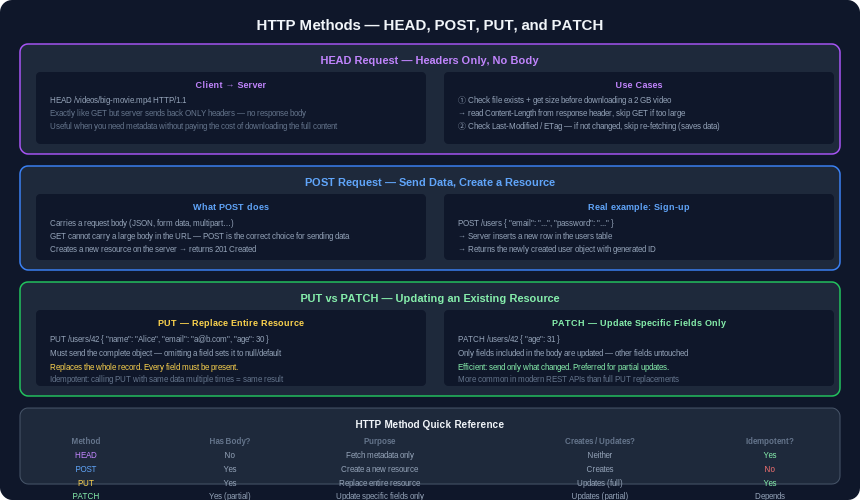
A HEAD request is identical to a GET request, with one difference: the server sends back only the response headers, not the response body.
HEAD /videos/big-movie.mp4 HTTP/1.1
Host: cdn.example.com
The response contains headers like Content-Length, Content-Type, Last-Modified, and ETag — but no actual file bytes.
Use Case 1: Check Before Downloading
Imagine a download button for a 2 GB video file. Before starting the download, you want to verify the file still exists and check its size:
@HEAD("videos/{filename}")
suspend fun checkFile(@Path("filename") name: String): Response<Unit>

val response = apiService.checkFile("big-movie.mp4")
val fileSize = response.headers()["Content-Length"]?.toLong()
If the file is too large for the available storage, the download is skipped — without having transferred a single byte of the actual file. A full GET request would have wasted bandwidth just to discover the size.
Use Case 2: Check If Data Has Changed
A HEAD request can check Last-Modified or ETag headers to decide whether the locally cached version is still valid. If the server returns the same ETag, the cached data is current and no re-fetch is needed. This is how conditional caching works.
POST — Send Data and Create a Resource
POST sends data in the request body to the server. It is the correct method whenever you need to:
- Submit data that is too large for a URL query parameter
- Create a new resource on the server
Creating a Resource
When a user signs up, the app sends a POST request with the user’s credentials. The server inserts a new row in the database and returns the newly created record:
@POST("users")
suspend fun createUser(@Body user: CreateUserRequest): Response<User>
data class CreateUserRequest(val email: String, val password: String)
val response = apiService.createUser(CreateUserRequest("user@example.com", "secret"))
// → server responds with 201 Created + the new User object with generated IDPOST is not idempotent — calling it twice creates two records. This distinguishes it from PUT.
Why Not GET for Sending Data?
GET parameters are placed in the URL (/search?query=android). URLs have practical length limits and are logged in server access logs, browser history, and proxy servers. Sending sensitive or large data in a URL is both insecure and unreliable. POST carries data in the body, which is not stored in logs or URLs.
PUT — Replace the Entire Resource
PUT updates an existing resource by sending a complete replacement. Every field must be included in the body. Fields omitted from the request are set to null or their default value on the server.
@PUT("users/{id}")
suspend fun updateUser(@Path("id") id: Int, @Body user: User): Response<User>
// Must include ALL fields — omitting "age" could reset it to null
val updated = User(name = "Alice", email = "alice@example.com", age = 30)
apiService.updateUser(42, updated)PUT is idempotent: sending the same PUT request five times produces the same result as sending it once. The resource ends up in the same state each time.
PATCH — Update Specific Fields Only
PATCH sends only the fields that need to change. Untouched fields remain as they are on the server.
@PATCH("users/{id}")
suspend fun patchUser(@Path("id") id: Int, @Body changes: Map<String, Any>): Response<User>
// Only age changes — name and email stay as they were
apiService.patchUser(42, mapOf("age" to 31))PATCH is more bandwidth-efficient than PUT because the payload is smaller. It is also safer — a bug that sends an incomplete body with PUT wipes out all omitted fields, whereas a partial PATCH body only modifies what is explicitly included.
Modern REST APIs tend to prefer PATCH for updates. PUT is still appropriate when the semantics genuinely require a full replacement.
Summary
| Method | Request Body | Purpose | Creates or Updates | Idempotent |
|---|---|---|---|---|
| HEAD | No | Fetch metadata only (headers) | Neither | Yes |
| POST | Yes | Create a new resource | Creates | No |
| PUT | Yes (complete) | Replace entire resource | Updates (full) | Yes |
| PATCH | Yes (partial) | Update specific fields | Updates (partial) | Depends |
One key distinction worth remembering for interviews:
- POST vs PUT: POST creates; PUT replaces. POST is not idempotent (two POSTs = two records). PUT is idempotent (ten PUTs with the same body = one final state).
- PUT vs PATCH: PUT requires the full object; PATCH accepts a subset. Sending a partial body with PUT deletes the missing fields.