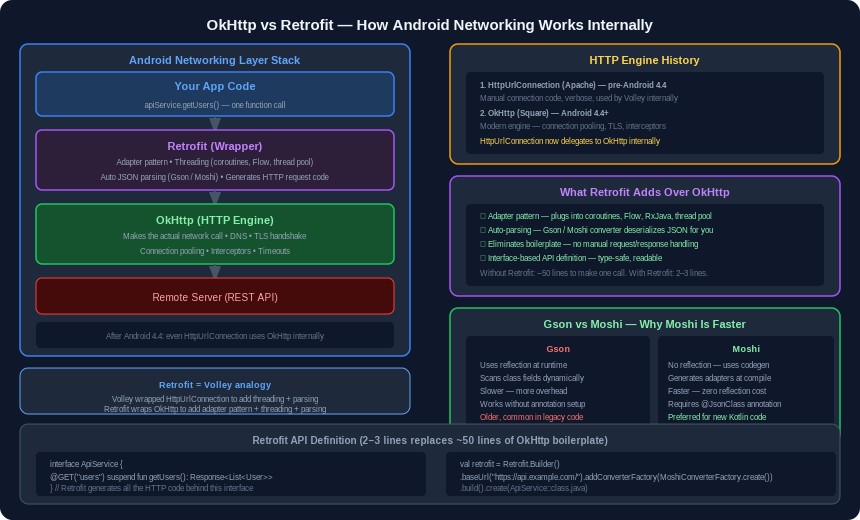
Every Android network call eventually goes through OkHttp. Whether you use Retrofit, Volley, or even the old HttpUrlConnection, OkHttp is the engine underneath. Understanding the distinction between the engine and the wrapper clarifies a lot about how Android networking libraries work and why they are designed the way they are.
The HTTP Engine History
Android networking has gone through two generations:
1. HttpUrlConnection (Apache) — the original
Before Android 4.4, HttpUrlConnection was the standard HTTP client. Writing a single network call required manually creating a connection, setting headers, reading an input stream byte by byte, handling errors, and closing the connection. Libraries like Volley were built on top of it to hide that complexity.
2. OkHttp (Square) — Android 4.4+
OkHttp replaced HttpUrlConnection as the HTTP engine. It handles DNS resolution, TLS handshakes, connection pooling, redirects, and compression transparently. Starting with Android 4.4, even if you write HttpUrlConnection code, Android internally routes it through OkHttp.
OkHttp: The HTTP Engine
OkHttp is the component that actually makes the network call. It:
- Resolves DNS
- Performs the TLS handshake (for HTTPS)
- Sends the HTTP request
- Reads the response
- Manages a connection pool to avoid repeating handshakes for the same server
- Supports interceptors — middleware that can read or modify every request and response
OkHttp is a complete HTTP client on its own. You can use it without Retrofit. Writing a call directly looks like this:
val client = OkHttpClient()
val request = Request.Builder().url("https://api.example.com/users").build()
val response = client.newCall(request).execute()
val body = response.body?.string()
This works, but for a real application with many endpoints, different response types, and background threading, you would write this setup for every single call — and manage thread switching yourself. That is where Retrofit comes in.
Retrofit: A Wrapper on Top of OkHttp
Retrofit does not make network calls itself. It delegates to OkHttp. What it adds is an abstraction layer that turns an annotated Kotlin interface into a fully functional HTTP client.
interface ApiService {
    @GET("users")
    suspend fun getUsers(): Response<List<User>>

    @POST("users")
    suspend fun createUser(@Body user: User): Response<User>
}
Retrofit generates all the OkHttp boilerplate behind this interface at runtime. A call that would take 50+ lines of OkHttp code becomes a single function with annotations.
Retrofit provides three things that OkHttp does not:
1. Adapter pattern for threading frameworks
Retrofit can integrate with coroutines (suspend functions), Kotlin Flow, RxJava, or a raw thread pool. Switching the threading model is a matter of changing the call adapter factory — the business logic stays unchanged.
2. Automatic JSON parsing
Retrofit supports converter factories. When a response arrives, the converter deserializes the JSON body into your data class automatically. You never touch JSONObject or BufferedReader.
3. Type-safe interface
The API definition is a Kotlin interface. Types are checked at compile time. If the response type changes, the compiler catches it.
The relationship is the same as Volley had with HttpUrlConnection: Volley wrapped HttpUrlConnection to add threading and parsing. Retrofit wraps OkHttp to do the same at a higher level of abstraction.
Gson vs Moshi — Why Moshi Is Faster
Both Gson and Moshi are JSON converter libraries that work with Retrofit. The difference is in how they discover the fields of your data class.
Gson uses reflection. At runtime, it inspects the class using the Java reflection API, reads field names and types dynamically, and maps JSON keys to fields. Reflection scans the class structure, performs string operations, and executes runtime lookups — it adds overhead on every parse.
Moshi uses code generation. The @JsonClass(generateAdapter = true) annotation triggers the Moshi Kotlin codegen plugin to generate a dedicated adapter class at compile time. At runtime, no reflection is needed — the adapter knows exactly which fields exist and how to map them. The result is faster parsing with less memory pressure.
// Gson — no annotation needed, works via reflection
data class User(val name: String, val age: Int)

// Moshi — codegen generates a type-safe adapter at compile time
@JsonClass(generateAdapter = true)
data class User(val name: String, val age: Int)
For new Kotlin projects, Moshi is the better choice. For legacy code already using Gson, the difference is measurable but not always worth the migration cost.
The Full Stack
When your app calls apiService.getUsers():
- Retrofit receives the call, checks the adapter (coroutine/Flow/RxJava), applies the converter factory.
- Retrofit builds an OkHttp
Requestobject from the annotations. - OkHttp handles the actual HTTP work: DNS, TLS, connection pool lookup, request send, response read.
- OkHttp returns the raw response to Retrofit.
- Retrofit passes the response body through the converter (Gson/Moshi) and returns a typed object to your code.
OkHttp handles the network. Retrofit handles the translation between Kotlin types and HTTP.
Summary
| OkHttp | Retrofit | |
|---|---|---|
| Role | HTTP engine — makes the actual call | Wrapper — adds abstraction over OkHttp |
| Threading | Manual | Adapter pattern — coroutines, Flow, RxJava |
| JSON parsing | Manual | Automatic via converter factory |
| API definition | Programmatic (request builders) | Declarative (annotated interface) |
| Use directly? | Yes, for low-level control | Yes, for most Android apps |
Retrofit without OkHttp cannot exist — every Retrofit request goes through OkHttp underneath.