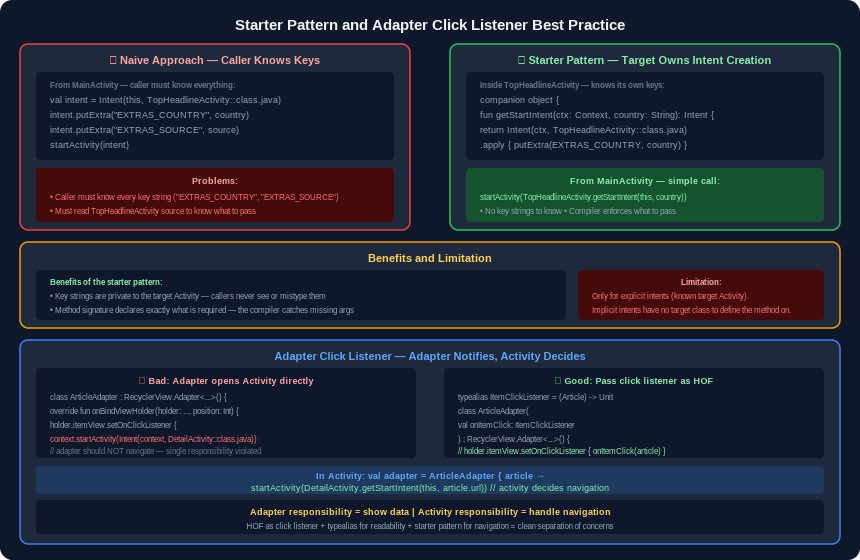
Two small patterns — the starter pattern for launching Activities and the lambda-based click listener for adapters — solve the same underlying problem: keeping each class responsible for only the things it should know about.
Starting an Activity — Two Approaches
There are two ways to start an Activity. The first is what most developers write initially:
// In MainActivity — the naive approach
val intent = Intent(this, TopHeadlineActivity::class.java)
intent.putExtra("EXTRAS_COUNTRY", country)
intent.putExtra("EXTRAS_SOURCE", source)
startActivity(intent)
This works, but it has a hidden cost. To write this code correctly, the developer in MainActivity must:
- Open
TopHeadlineActivityand read its source to discover what extras it expects. - Copy the key strings (
"EXTRAS_COUNTRY","EXTRAS_SOURCE") exactly — one typo means a missing or wrong extra at runtime. - Know which extras are required and which are optional.
Every caller of TopHeadlineActivity carries this burden. If the Activity later adds a new required extra, every call site must be updated manually — and the compiler will not warn about the ones that were missed.
The Starter Pattern
The starter pattern moves the Intent construction inside the target Activity itself:
// Inside TopHeadlineActivity
companion object {
    private const val EXTRAS_COUNTRY = "extra_country"

    fun getStartIntent(context: Context, country: String): Intent {
        return Intent(context, TopHeadlineActivity::class.java).apply {
            putExtra(EXTRAS_COUNTRY, country)
        }
    }
}
The caller becomes a single clean line:
// In MainActivity
startActivity(TopHeadlineActivity.getStartIntent(this, country))
The key string EXTRAS_COUNTRY is now private to TopHeadlineActivity. No external class ever sees or types it. The method signature declares exactly what the caller must provide — the compiler enforces it. If country is missing, the code does not compile.
When a new required extra is added to TopHeadlineActivity, the method signature changes. Every call site breaks at compile time instead of silently passing the wrong data at runtime.
Why the Starter Pattern Cannot Be Used for Implicit Intents
The starter pattern is only applicable to explicit intents — cases where the caller knows the exact class being launched. For implicit intents, the target Activity is unknown at compile time (it could be a system app, a third-party app, or chosen at runtime). There is no class to define the factory method on.
// Implicit intent — no target class → no starter pattern possible
val intent = Intent(Intent.ACTION_SEND).apply {
    type = "text/plain"
    putExtra(Intent.EXTRA_TEXT, shareText)
}
startActivity(Intent.createChooser(intent, "Share via"))
The starter pattern is a team convention for code within the same project — places where one developer writes the Activity and another calls it.
Adapter Responsibility: Show Data Only
A RecyclerView.Adapter has one responsibility: bind data to views and display them. Navigation — deciding which screen to open when an item is tapped — is not its responsibility.
A common mistake:
class ArticleAdapter(private val context: Context) : RecyclerView.Adapter<ArticleViewHolder>() {
    override fun onBindViewHolder(holder: ArticleViewHolder, position: Int) {
        holder.itemView.setOnClickListener {
            // ❌ adapter is making a navigation decision
            context.startActivity(Intent(context, DetailActivity::class.java).apply {
                putExtra("url", articles[position].url)
            })
        }
    }
}
Three problems with this approach:
- Navigation logic is buried in the adapter. When the navigation changes — animation added, a different screen opened, A/B test variant — the adapter must be modified, even though it has nothing to do with navigation.
- The adapter holds a
Contextreference, which can cause memory leaks if the Activity is destroyed while the adapter still holds a reference. - The adapter makes assumptions about what should happen on click. The Activity might want different behavior depending on state — for example, opening a bottom sheet on tablets, a new activity on phones.
The Lambda-Based Click Listener
The fix is to pass the click handler into the adapter as a lambda (higher-order function):
typealias ItemClickListener = (Article) -> Unit

class ArticleAdapter(
    private val onItemClick: ItemClickListener
) : RecyclerView.Adapter<ArticleViewHolder>() {

    override fun onBindViewHolder(holder: ArticleViewHolder, position: Int) {
        holder.itemView.setOnClickListener {
            onItemClick(articles[position])   // notify, don't navigate
        }
    }
}
The adapter’s job is only to call onItemClick(article) when a tap occurs. It does not know or care what happens next.
In the Activity, the lambda is provided at construction time:
val adapter = ArticleAdapter { article ->
    startActivity(DetailActivity.getStartIntent(this, article.url))
}
Now the Activity owns the navigation decision. The adapter is completely decoupled from navigation. If the click behavior needs to change — open a dialog instead, log an analytics event, check user permissions first — only the Activity changes.
Combining Starter Pattern and Adapter Listener
The two patterns compose naturally:
// Adapter — passes the article back on click
val adapter = ArticleAdapter { article ->
    startActivity(
        TopHeadlineActivity.getStartIntent(this, article.url)
    )
}- The adapter calls the lambda with the tapped article.
- The lambda uses the starter pattern to build and start the Intent.
TopHeadlineActivityknows its own keys.- The adapter knows nothing about navigation.
- The Activity knows nothing about key strings.
Each class is responsible for exactly what it owns.
Using typealias for Readable Parameter Types
The adapter constructor parameter (Article) -> Unit is functional but not immediately expressive. A reader has to parse the type to understand its purpose.
typealias assigns a meaningful name:
typealias ItemClickListener = (Article) -> UnitThe adapter constructor becomes self-documenting:
class ArticleAdapter(
    private val onItemClick: ItemClickListener
) : RecyclerView.Adapter<ArticleViewHolder>()
At compile time the alias is replaced with (Article) -> Unit. There is no runtime representation — no performance overhead, no extra class generated.
Summary
| Pattern | What it solves |
|---|---|
| Starter pattern | Hides Intent key strings from callers; compiler enforces required parameters |
| Lambda click listener | Adapter notifies on click; Activity decides what to do — single responsibility |
typealias for lambdas | Names complex function types for readability; zero runtime cost |
Starter pattern rule: the target Activity builds its own Intent. The caller only provides data values, never key strings.
Adapter rule: adapter calls the click lambda and stops there. Navigation, logging, and business logic belong in the Activity or ViewModel — not the adapter.