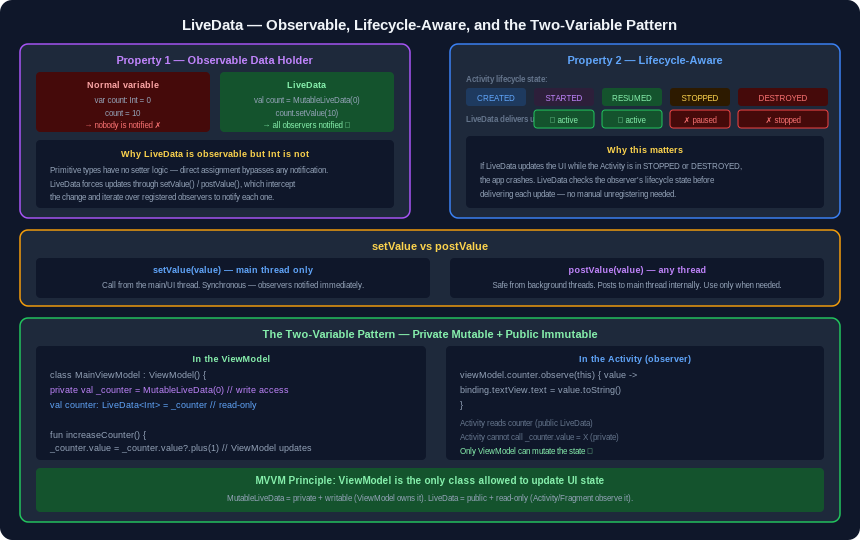
LiveData solves a specific communication problem: the ViewModel holds data, but how does the Activity know when that data changes? Polling the ViewModel on every frame is wasteful. Calling the Activity directly from the ViewModel couples them together and breaks the MVVM boundary. LiveData is the observable bridge that lets the Activity react to changes without either side needing a direct reference to the other.
Property 1 — LiveData Is an Observable Data Holder
A normal variable has no mechanism to notify anyone when its value changes:
var counter: Int = 0
counter = 10   // nothing happens — no one is told
The value updates silently. Any component that cares about the change has to check the value manually, at the right time.
LiveData changes this by forcing all updates through a controlled setter. Instead of assigning directly, you call setValue() or postValue():
val counter = MutableLiveData(0)
counter.value = 10   // internally calls setValue(10)
Inside setValue(), LiveData iterates over all registered observers and calls each one with the new value. The observer gets the update immediately, without polling.
Why normal variables cannot do this: primitive types and data classes have no setter hook. Assigning counter = 10 is a raw memory write — there is nowhere to insert notification logic. LiveData wraps the value and routes all writes through a method, giving it full control over when and how observers are notified.
Property 2 — LiveData Is Lifecycle-Aware
The second property is the one that prevents crashes.
Consider this observer:
viewModel.counter.observe(this) { value ->
    binding.textView.text = value.toString()
}
If the Activity is in the background — paused, stopped, or destroyed — and LiveData delivers an update, the code inside the lambda runs. Accessing a View when the Activity is stopped can cause an IllegalStateException. Accessing a View when the Activity is destroyed crashes the app.
LiveData prevents this automatically. Before delivering any update, it checks the lifecycle state of the observer’s owner (this in the observe() call). Updates are delivered only when the owner is in the STARTED or RESUMED state — the two states where the UI is visible and interactive.
| Lifecycle State | Updates Delivered |
|---|---|
| CREATED | No |
| STARTED | Yes |
| RESUMED | Yes |
| STOPPED | No |
| DESTROYED | No (observer removed) |
When the Activity moves to STOPPED (background), updates are queued but not delivered. When it returns to RESUMED, the latest value is delivered immediately — the Activity catches up without missing any state. When the Activity is permanently DESTROYED, LiveData removes the observer automatically. There is no need to unregister observers manually.
This is what “lifecycle-aware” means: the component understands and respects the lifecycle of its consumers.
setValue vs postValue
LiveData exposes two ways to update its value:
setValue(value) — must be called from the main (UI) thread. The update is synchronous: observers are notified in the same call stack, on the main thread, before setValue() returns.
postValue(value) — can be called from any thread, including background threads. Internally it posts the update to the main thread’s message queue. The observers are notified asynchronously on the main thread.
// Calling from main thread — use setValue
_counter.value = newValue

// Calling from a background coroutine or thread — use postValue
_counter.postValue(newValue)
postValue has slightly more overhead because it schedules a runnable on the main thread looper. Use setValue whenever you are already on the main thread. Calling postValue unnecessarily from the main thread adds overhead without benefit — use the simpler call.
A common pattern in ViewModels with coroutines:
viewModelScope.launch {
    val result = repository.fetchData()   // runs on IO dispatcher
    withContext(Dispatchers.Main) {
        _data.value = result              // setValue from main thread
    }
}
Or simpler with postValue if you stay on the IO dispatcher:
viewModelScope.launch(Dispatchers.IO) {
    val result = repository.fetchData()
    _data.postValue(result)   // safe from background thread
}
The Two-Variable Pattern
A standard ViewModel with LiveData always declares two variables for each piece of state:
class MainViewModel : ViewModel() {
    private val _counter = MutableLiveData(0)   // private, writable
    val counter: LiveData<Int> = _counter        // public, read-only
}
This pattern comes up in interviews frequently. The question asked is: why two variables instead of one?
The answer is about MVVM boundaries.
_counterisprivate. Only code insideMainViewModelcan write to it.counterispublic. Activities and Fragments can read and observe it, but they receive aLiveData<Int>— the read-only interface.LiveDatahas nosetValue()orpostValue()method. There is no way to mutate it from outside the ViewModel.
The MVVM principle states: the ViewModel is the only class that updates UI state. The Activity and Fragment are consumers of that state — they observe and react, but never write.
If a single MutableLiveData were exposed publicly:
val counter = MutableLiveData(0) // anyone can call counter.value = XAny Activity, Fragment, or adapter in the project could update the counter directly, bypassing the ViewModel’s logic. The state machine breaks. Bugs become hard to trace because state changes originate from multiple places.
The two-variable pattern enforces the boundary at the type system level. The compiler prevents a LiveData holder from calling setValue() — not just by convention, but structurally.
Connecting LiveData to ViewModel
LiveData and ViewModel are designed to work together:
// ViewModel
class MainViewModel : ViewModel() {
    private val _counter = MutableLiveData(0)
    val counter: LiveData<Int> = _counter

    fun increaseCounter() {
        _counter.value = _counter.value?.plus(1)
    }
}

// Activity
viewModel = ViewModelProvider(this)[MainViewModel::class.java]

viewModel.counter.observe(this) { value ->
    binding.textView.text = value.toString()
}

binding.buttonClickMe.setOnClickListener {
    viewModel.increaseCounter()
}
The flow:
- Button click → Activity calls
viewModel.increaseCounter(). - ViewModel updates
_counterviasetValue(). - LiveData notifies the observer.
- Observer updates the TextView.
The Activity never reads _counter directly. The ViewModel never references the Activity. They are connected only through the observable, which respects the Activity’s lifecycle.
Summary
| Property | What it means |
|---|---|
| Observable | Updates routed through setValue/postValue → observers notified automatically |
| Lifecycle-aware | Updates delivered only in STARTED or RESUMED state — no crashes, no manual unregister |
setValue | Main thread only, synchronous |
postValue | Any thread, posts to main thread asynchronously |
private MutableLiveData | ViewModel owns the write access |
public LiveData | Observers get read-only access — MVVM boundary enforced by the type system |