The previous post covered the slow-loading problem — how cancelling stale tasks frees up threads for the images the user is actually looking at. But cancellation only helps within a session. What about the same image that appears every time the user opens the app? Without caching, it downloads and decodes from scratch every time, paying the full 7-second cost on every launch.
Caching is what makes repeat loads instant.
RAM vs Disk — The Fundamental Difference
Every Android device has two distinct storage layers that matter for caching:
| RAM | Disk (Internal/SD Card) | |
|---|---|---|
| Speed | Very fast | Slower |
| Typical size | 2–4 GB total (app gets ~50–200 MB) | 64–256 GB |
| Persistence | Lost when app is killed or device restarts | Survives app kills and restarts |
| Use for cache | Active session — in-flight bitmaps | Cross-session — downloaded files |
This distinction shapes every caching decision. A variable you store in RAM — even a counter at count = 5 — is gone the moment the process is killed. If you need data to survive a restart, it must go to disk (a file, shared preferences, or a database — all of which ultimately write to the file system).
For image caching:
- RAM cache — keeps decoded bitmaps ready during the current session. Zero decode cost on repeat access. Lost when the app closes.
- Disk cache — keeps the downloaded file across sessions. On the next open, you decode the file again (~2 s) instead of downloading it again (~5 s).
What Is a Cache, Precisely?
A cache is a bounded storage location used to speed up repeat access. Two properties are non-negotiable:
1. Size Limit
A cache must have a hard ceiling — say 10 MB for RAM, 20 MB for disk. Without a limit it is just uncontrolled storage that grows until it fills the device.
2. Eviction Policy
When the cache is full and a new entry needs to be stored, something must be removed. The rule that decides what to remove is the eviction policy.
Simple key-value storage without these two properties is not a cache — it is just a map that will eventually run out of space.
LRU: Least Recently Used
The most widely used eviction policy in Android is LRU — Least Recently Used.
The idea is straightforward: when the cache is full and a new item arrives, remove the item that was accessed least recently — the one that has gone the longest without being used.
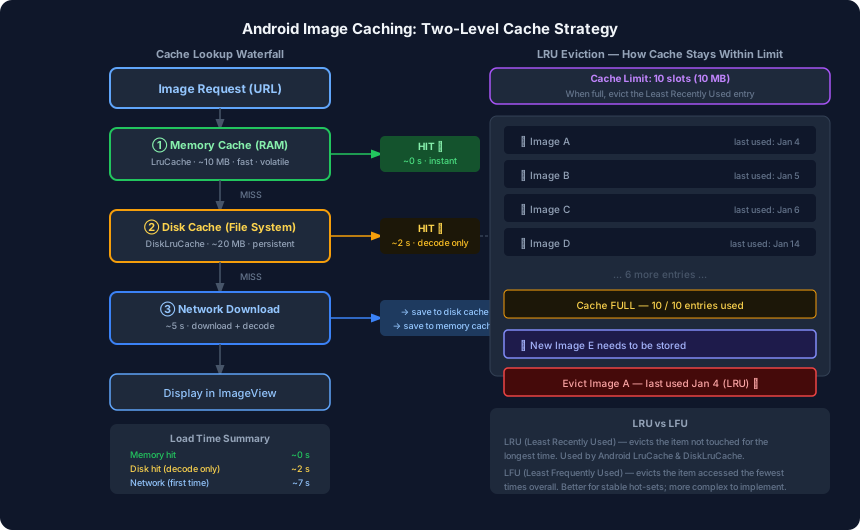
Example with 10 slots:
Imagine a room that holds exactly 10 balls. Each time a ball is played with, it becomes “recently used.” The others gradually become “less recently used.”
| Ball | Last used |
|---|---|
| Image A | Jan 4 |
| Image B | Jan 5 |
| Image C | Jan 6 |
| Image D | Jan 14 |
| … 6 more … | … |
The room is full. A new image arrives and needs a slot. Which ball gets removed? Image A — it was last touched on Jan 4, the longest ago of any entry. Recently used items (Image D, Jan 14) survive because they are probably still relevant.
This works well in practice because recently viewed images are statistically likely to be viewed again. The user’s profile picture, the same feed item scrolled past multiple times — these stay hot. Old images from a list the user scrolled through once get evicted naturally.
LRU vs LFU
LFU (Least Frequently Used) evicts the item that has been accessed the fewest total times, regardless of when. It handles stable “hot sets” better — if a few images are opened constantly, LFU keeps them forever. But it is more complex to implement and can retain stale items that were popular long ago but are no longer relevant. Android’s built-in LruCache and DiskLruCache both use LRU.
The Two-Level Cache in Practice
Image loading uses a waterfall — each level is checked before falling through to the next, slower source:
Request URL
    │
    ▼
① Memory Cache (RAM) ──── HIT → display instantly (~0 s)
    │ MISS
    ▼
② Disk Cache (File System) ── HIT → decode → display (~2 s)
    │                                    └─→ store in memory cache
    │ MISS
    ▼
③ Network Download ──────────── download + decode → display (~7 s)
                                      └─→ store on disk cache
                                      └─→ store in memory cache
First open: network hit → 7 s. Image stored in both caches.
Same session, same image again: memory cache hit → 0 s.
App killed and reopened: memory cache is empty (RAM lost), disk cache still has the file → decode only → 2 s. Image stored in memory cache again.
After very long time or disk cache eviction: back to network → 7 s.
From the user’s perspective, images appear instantly after the first load, and even a fresh app open loads in 2 s instead of 7 s.
Android APIs: LruCache and DiskLruCache
In-Memory: LruCache
val maxMemory = (Runtime.getRuntime().maxMemory() / 1024).toInt()
val cacheSize = maxMemory / 8  // use 1/8 of available memory

val memoryCache = object : LruCache<String, Bitmap>(cacheSize) {
    override fun sizeOf(key: String, bitmap: Bitmap): Int {
        return bitmap.byteCount / 1024  // size in KB
    }
}

// Store
memoryCache.put(url, bitmap)

// Retrieve
val cached: Bitmap? = memoryCache.get(url)
LruCache is part of the Android framework (android.util.LruCache). It handles eviction automatically — when a new entry would exceed the size limit, it removes the least recently used entry first.
On-Disk: DiskLruCache
Disk caching is handled by DiskLruCache (available via the Glide or OkHttp dependency, or the Jetpack disklrucache library). It stores entries as files in the app’s cache directory:
val cacheDir = context.cacheDir
val diskCache = DiskLruCache.open(
    cacheDir,
    appVersion = 1,
    valueCount = 1,
    maxSize = 20L * 1024 * 1024  // 20 MB
)
Glide wires both caches together and manages the waterfall lookup automatically.
When to Use RAM vs Disk for Other Data
The same principles apply beyond image loading. Before reaching for SharedPreferences or a database, ask: does this data need to survive an app kill?
- No (e.g. passing a value from one Activity to another within the same session) → use a Bundle, ViewModel, or singleton in RAM.
- Yes (e.g. user preferences, downloaded content, a counter that should persist) → write to disk via shared preferences, a file, or a Room database.
Shared preferences and databases are all ultimately files on the file system. They are not magic — they are just structured ways to write bytes to disk.
Summary
| Level | Storage | Speed | Persists? | Typical size |
|---|---|---|---|---|
| Memory cache | RAM | ~0 s | No — lost on kill | ~10 MB |
| Disk cache | File system | ~2 s (decode) | Yes | ~20 MB |
| Network | Remote server | ~7 s | — | unlimited |
A well-implemented image loader checks memory first, then disk, then network — and stores every network result in both caches so the next request is cheaper. LRU eviction keeps each cache within its size limit by automatically dropping the entries that have not been needed recently.
This three-post series started with a naive BitmapFactory.decodeFile call and a crash. It ends with a system that loads images instantly, wastes no threads, and rarely touches the network after the first load. That is exactly what Glide, Fresco, and Coil implement under the hood.