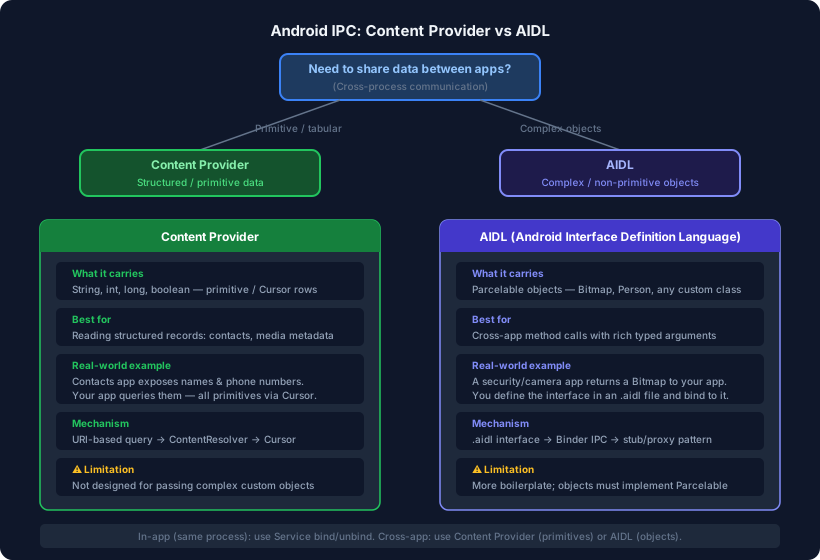
Once an Android app splits work across multiple processes (or needs to talk to a completely separate app), it faces a fundamental challenge: processes do not share memory. Each process lives in its own isolated address space. To pass data between them, Android provides a set of IPC (Inter-Process Communication) mechanisms. The two most common are Content Provider and AIDL.
Picking the wrong one leads to unnecessary complexity or, worse, runtime errors. Here is how to think about it.
In-App Communication: Service Bind / Unbind
Before reaching for Content Provider or AIDL, ask whether both sides are inside the same app (same process). If they are, a bound Service is the right tool. The client binds to the service, gets a Binder reference, and calls methods on it directly — no serialization overhead, no process boundary to cross.
// Client side
val connection = object : ServiceConnection {
    override fun onServiceConnected(name: ComponentName, binder: IBinder) {
        val service = (binder as MyService.LocalBinder).getService()
    }
    override fun onServiceDisconnected(name: ComponentName) {}
}
bindService(intent, connection, Context.BIND_AUTO_CREATE)
Content Provider and AIDL come into play only when crossing a process boundary — either to a separate process within the same app or to a completely different app.
Content Provider — For Primitive / Tabular Data
A Content Provider exposes data through a URI-based interface backed by a Cursor. The data model is deliberately simple: rows and columns of primitive values — strings, integers, longs, booleans, and blobs.
When to use it:
- Your data is naturally tabular (like a database table).
- You are sharing read/write access to structured records across apps.
- The data types are primitive — no need to pass custom objects.
Classic example — reading the device contacts:
val cursor = contentResolver.query(
    ContactsContract.CommonDataKinds.Phone.CONTENT_URI,
    arrayOf(
        ContactsContract.CommonDataKinds.Phone.DISPLAY_NAME,
        ContactsContract.CommonDataKinds.Phone.NUMBER
    ),
    null, null, null
)
cursor?.use {
    while (it.moveToNext()) {
        val name = it.getString(0)
        val number = it.getString(1)
    }
}
The Contacts app is a Content Provider. Your app queries it with a URI and gets back a Cursor of primitive values — name (String) and phone number (String). No complex object crosses the process boundary.
What it cannot do well:
Content Provider is not designed to transport arbitrary custom objects. If you try to stuff a Bitmap or a Person data class into a Cursor, you will be fighting the API the entire time.
AIDL — For Complex / Non-Primitive Objects
AIDL (Android Interface Definition Language) lets you define a proper interface — with typed method signatures — that works transparently across a process boundary. Under the hood it uses the Binder IPC mechanism, but AIDL generates all the stub and proxy boilerplate for you.
The key capability: you can pass any object that implements Parcelable. That includes Bitmap, custom data classes, lists of objects, and more.
When to use it:
- You need to call methods on a remote component, not just query data.
- The arguments or return values are complex objects (not just primitives).
- Two separate apps need to exchange rich, structured data.
Defining an AIDL interface:
// IImageService.aidl
interface IImageService {
    Bitmap getProcessedImage(int imageId);
    void applyFilter(in Bitmap source, String filterName);
}
Example scenario: A security or camera app processes images and returns a Bitmap to your app. A Content Provider cannot return a Bitmap cleanly through a Cursor. AIDL handles it without issue — you define the method, annotate the Bitmap parameter, and the generated code handles marshalling across the process boundary.
Quick Decision Guide
| Question | Answer | Use |
|---|---|---|
| Same process, same app? | Yes | Bound Service |
| Cross-process, primitive/tabular data? | Yes | Content Provider |
| Cross-process, custom objects (Bitmap, Parcelable)? | Yes | AIDL |
| Need method-call semantics (not just data queries)? | Yes | AIDL |
Under the Hood: How Binder IPC Works
Both Content Provider and AIDL rely on Binder — Android’s kernel-level IPC driver. When a client calls a method across a process boundary, Binder:
- Serialises (parcels) the arguments in the client process.
- Copies the data to a shared kernel buffer (one copy, not two).
- Wakes up the server process and delivers the parcel.
- The stub deserialises it and calls the actual implementation.
- The return value travels back the same way.
This single-copy design is what makes Android IPC efficient compared to traditional Unix sockets or pipes, which require two copies. AIDL generates the parcelling code automatically; with Content Provider the framework handles it for the Cursor columns.
Summary
| Content Provider | AIDL | |
|---|---|---|
| Data type | Primitive / tabular (Cursor rows) | Any Parcelable object |
| Interface style | URI query / insert / update / delete | Method calls on a typed interface |
| Boilerplate | Low — extend ContentProvider | Medium — write .aidl file, implement stub |
| Typical use | Contacts, media store, custom DBs | Bitmaps, cross-app service calls, custom objects |
| Transport | Binder (via ContentResolver) | Binder (directly) |
When you need to share a list of names and phone numbers, reach for Content Provider. When you need to hand a Bitmap or a custom object to another app, AIDL is the right tool. Defaulting to one when the other fits is a common source of unnecessary complexity in Android IPC code.