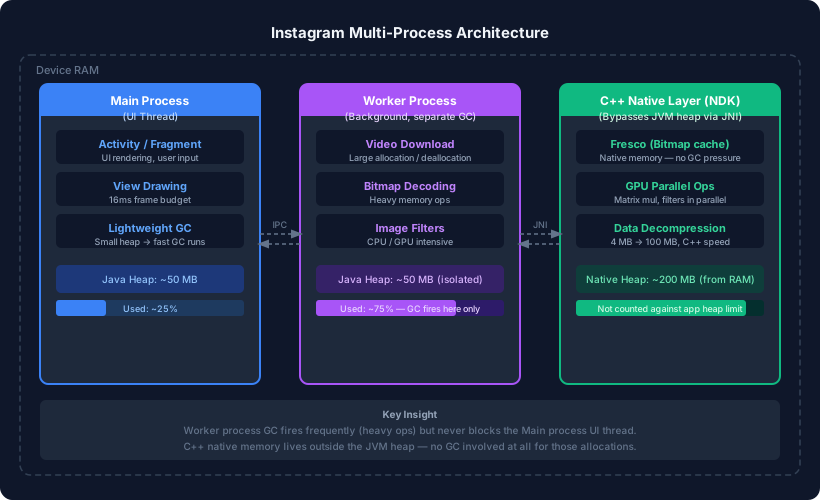
Instagram constantly streams videos, decodes bitmaps, and applies image filters — yet the feed scrolls smoothly. If we put all of that work inside a single process the way a typical app does, the garbage collector would fire every few milliseconds and the UI thread would stutter. So what does Instagram actually do differently?
The Root Problem: One Process, One GC
In a standard Android app, everything runs inside a single process. That process has one JVM heap — and one garbage collector watching over it.
Every time a large video chunk is downloaded and decoded, memory is allocated and then released. Frequent allocation/deallocation is one of the fastest ways to trigger GC. When GC runs on the main (UI) thread, the screen cannot refresh until it finishes. Miss the 16 ms frame window and the user sees a dropped frame — that choppy feeling we call lag.
The bigger the heap, the longer each GC run takes:
| Heap Size | Approx. GC Time | Task (10 ms) + GC | Result |
|---|---|---|---|
| 50 MB | ~2 ms | 12 ms | Smooth ✅ |
| 200 MB | ~8 ms | 18 ms | Lag ❌ |
The naive fix — android:largeHeap="true" — makes this worse by giving GC more memory to scan on every run.
Solution 1: Split Work Across Multiple Processes
Android allows a single app to spawn multiple processes. Each process has its own isolated memory space and, crucially, its own independent garbage collector.
Instagram’s architecture roughly looks like this:
- Main process — handles the UI, animations, and user input. Its heap stays small, so GC runs here are fast and infrequent.
- Worker process(es) — handle video downloads, bitmap decoding, and image filtering. Heavy allocation/deallocation happens here.
When GC fires repeatedly inside a worker process because of a large video download, the main process never knows it happened. The UI thread keeps drawing frames without interruption.
Processes talk to each other through Inter-Process Communication (IPC). Each process also has its own separate GC instance — they do not share a garbage collector.
Key rule: Anything that causes frequent memory churn should live in a process that does not own the UI thread.
Solution 2: Native Memory via C++ NDK
Even with multiple processes, the JVM heap has a ceiling. Any object created with new in Kotlin or Java counts against that limit and is subject to GC.
C++ code accessed through the Android NDK (Native Development Kit) allocates memory directly from RAM using the OS, completely bypassing the JVM heap. This memory is not counted against the app’s heap limit and is never touched by the Java garbage collector.
Instagram (and its parent library, Fresco) stores decoded bitmaps in native memory for exactly this reason. Compare the two approaches:
| Library | Language | Bitmap Storage | GC Impact |
|---|---|---|---|
| Fresco | C++ (via JNI) | Native heap | None — GC never sees it |
| Glide | Java/Kotlin | JVM heap | GC scans and may pause for it |
The bridge between Java/Kotlin code and C++ is called JNI (Java Native Interface). Your Kotlin code calls a native method, and the JNI layer routes that call to the corresponding C++ function. The C++ code can then allocate, manipulate, and free memory on the native heap without involving the JVM at all.
Why C++ Is Faster for Compute-Heavy Tasks
GPU Parallelism
When Instagram applies a filter that involves matrix operations, C++ can distribute those calculations across multiple GPU cores simultaneously. Java executes the same loop sequentially — one element at a time. For a 3×3 matrix multiplication:
- C++: all 9 multiplications can be dispatched to the GPU in parallel — done in roughly one step.
- Java: iterates through rows and columns one by one — nine sequential steps.
This is why compute-heavy operations (filters, video decoding, ML inference) are almost always implemented in native code on Android.
APK Compression: A Real-World Example
Suppose an app needs 100 MB of offline data bundled with it.
- Bundling it raw → APK grows to ~110 MB. Too large for many users to download.
- Downloading after install → 100 MB download. Slow and fails in low-connectivity regions.
The C++ solution:
- Compress the 100 MB data to ~4 MB using a native compression library.
- Ship a ~10 MB APK (base APK + 4 MB compressed asset).
- On first launch, decompress in C++ — fast enough that the user barely notices.
Java-based decompression of 100 MB is slow because it runs on a single thread and goes through the JVM. C++ decompression handles the same data significantly faster by operating closer to the hardware and, where supported, using SIMD instructions.
Thread Count and Memory Cost
One more thing the class notes touch on: threads are not free.
Each thread requires its own stack. On Android, a thread stack typically occupies between 0.5 MB and 1 MB depending on the device. Creating 1,000 threads would consume 500 MB to 1 GB of memory just for stacks — before those threads do any actual work.
This is why Android apps use thread pools (via ExecutorService, coroutines with Dispatchers.IO, etc.) rather than spawning raw threads for every task.
Summary
| Technique | What It Solves |
|---|---|
| Multiple processes | Isolates heavy GC from the UI thread |
| C++ NDK / native memory | Allocates outside the JVM heap, no GC involvement |
| JNI bridge | Lets Kotlin/Java call C++ code seamlessly |
| Thread pools | Avoids ballooning memory from uncapped thread creation |
A smooth Instagram feed is not magic — it is a deliberate architectural decision to keep the UI process lean while offloading everything memory-intensive to worker processes and native code.