The best way to understand any framework component is to build it yourself first. Before using Android’s ViewModel, building one from scratch reveals exactly what problem it solves and why the design is the way it is.
What Is a ViewModel?
A ViewModel is a class that holds and exposes UI state. It has two responsibilities:
- Hold the UI state — anything displayed on screen (counters, lists, form values).
- Survive configuration changes — orientation change, font size change, language change all cause the Activity to be destroyed and recreated. The ViewModel must keep its data through this.
In MVVM architecture, the ViewModel sits between the data layer and the UI layer. The UI layer observes changes in the ViewModel rather than managing state itself.
The First Problem: Data Resets on Rotation
Consider a simple counter example:
class MainViewModel {
    private val _counter: MutableLiveData<Int> = MutableLiveData(0)
    val counter: LiveData<Int> = _counter

    fun increaseCounter() {
        _counter.value = _counter.value?.plus(1)
    }
}
And in the Activity:
viewModel = MainViewModel()

viewModel.counter.observe(this) {
    binding.textView.text = it.toString()
}
binding.buttonClickMe.setOnClickListener {
    viewModel.increaseCounter()
}
Click the button five times. The counter shows 5. Now rotate the device.
The counter jumps back to 0.
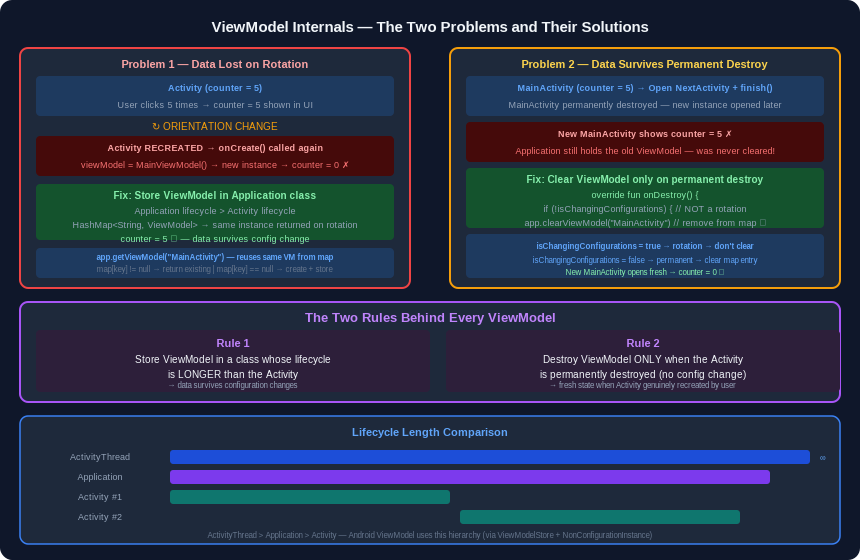
Why? A configuration change triggers onCreate() again. The Activity is recreated from scratch. When onCreate() runs, it executes viewModel = MainViewModel() — a brand-new object with counter = 0. The old object and its state are gone.
This is the core issue: the ViewModel is tied to the Activity’s lifecycle, so it dies when the Activity dies — even temporarily.
Fix 1: Store the ViewModel in the Application Class
The fix is straightforward: don’t store the ViewModel inside the Activity. Store it somewhere whose lifecycle is longer than the Activity.
The Application class fits. An Activity may be created and destroyed multiple times within a single app session, but the Application object persists for the full session.
class MainApplication : Application() {
    private val map = HashMap<String, ViewModel>()

    fun getViewModel(key: String): ViewModel {
        if (map[key] != null) {
            return map[key]!!
        }
        val viewModel = MainViewModel()
        map[key] = viewModel
        return viewModel
    }

    fun clearViewModel(key: String) {
        map.remove(key)
    }
}
The getViewModel() method checks whether a ViewModel already exists for the given key. If yes, it returns the existing one. If not, it creates a new one, stores it, and returns it. The key can be the Activity name — any unique string works.
In the Activity:
viewModel = (application as MainApplication).getViewModel("MainActivity") as MainViewModelNow rotate the device. The Activity is recreated, onCreate() runs again, and calls getViewModel("MainActivity"). The Application already has an entry for "MainActivity" in its map. It returns the same ViewModel instance. The counter shows 5.
First problem solved.
The Second Problem: Data Survives Permanent Destruction
The Application-based approach introduces a new bug.
Scenario: The user is in MainActivity with counter = 5. They tap a button that calls startActivity(nextActivity) and finish(). The Activity is permanently destroyed — not a rotation, but an intentional navigation away. Later, from NextActivity, they open MainActivity again.
The expected behavior: a fresh MainActivity with counter = 0.
What actually happens: counter shows 5.
The Application class held on to the ViewModel even though MainActivity was permanently gone. The map entry was never cleared. When the new MainActivity asks for its ViewModel, it gets the old one.
Fix 2: Clear the ViewModel Only on Permanent Destruction
The fix: add a clearViewModel() call inside onDestroy(), but only when the destruction is not caused by a configuration change.
override fun onDestroy() {
    super.onDestroy()
    if (!isChangingConfigurations) {
        (application as MainApplication).clearViewModel("MainActivity")
    }
}
isChangingConfigurations is a property on Activity that Android sets to true when the Activity is being destroyed due to a configuration change (rotation, language change, font change). When it is false, the Activity is being permanently destroyed.
- Rotation →
isChangingConfigurations = true→ skipclearViewModel()→ ViewModel survives - User navigates away →
isChangingConfigurations = false→clearViewModel()runs → ViewModel removed
Now MainActivity gets a fresh ViewModel the next time it opens.
The Two Rules Behind Every ViewModel
These two fixes reveal the exact principles that Android’s official ViewModel follows internally:
Rule 1: Store the ViewModel in a class whose lifecycle is longer than the Activity.
This ensures data survives configuration changes. The Activity is temporary. The store must outlive it.
Rule 2: Destroy the ViewModel only when the Activity is permanently destroyed, not during a configuration change.
This ensures stale data does not leak into a new Activity instance when the user explicitly navigates away.
Android’s ViewModel implementation follows both rules — not through magic, but by applying the same logic more robustly using ViewModelStore, NonConfigurationInstance, and ActivityThread.
Configuration Changes Are Not Just Rotation
It is a common misconception that configuration changes only mean screen rotation. Android triggers a configuration change — and thus recreates the Activity — for several events:
- Device rotated (portrait ↔ landscape)
- User changes font size in device settings
- User switches the system language
- Night mode toggled
- Screen density changed (connecting to an external display)
The ViewModel must survive all of these, not just rotation.
Connecting to Android’s Actual ViewModel
When you call:
viewModel = ViewModelProvider(this)[MainViewModel::class.java]Android is doing exactly what was built above — just with a more complete implementation. The ViewModelProvider retrieves or creates the ViewModel and stores it in a ViewModelStore. That store is kept inside NonConfigurationInstance which is temporarily held by ActivityThread (a class whose lifecycle is longer than both the Activity and Application). After a configuration change, ActivityThread hands the same NonConfigurationInstance back to the recreated Activity — the ViewModel is intact.
How ViewModelProvider handles the full lifecycle chain is the focus of the next post.
Summary
| Scenario | Naive approach | Application-based fix |
|---|---|---|
| Rotation | Data lost (new VM instance) | Data survives ✅ |
| Permanent destroy → reopen | Fresh data ✅ | Stale data survives ✗ |
| Rotation + permanent destroy fix | — | isChangingConfigurations guard ✅ |
The two rules: store in a longer-lived class; clear only on permanent destruction. Android’s ViewModel does exactly this — you’ve just built the prototype.