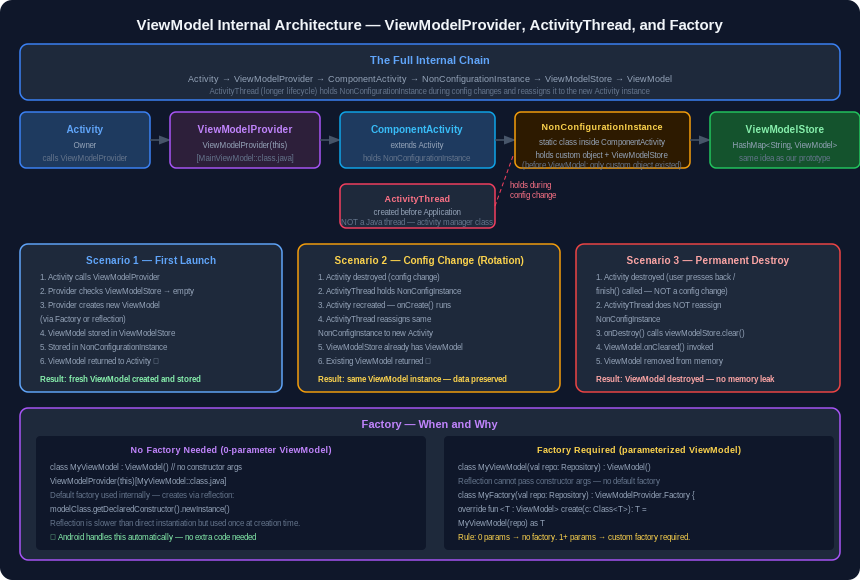
The previous post built a ViewModel prototype using an Application-level HashMap, revealing the two rules a ViewModel must follow: store in a longer-lived class, clear only on permanent destruction. Android’s official implementation follows the same rules with a more complete architecture. This post walks through the full internal chain.
The Full Internal Chain
When you write:
viewModel = ViewModelProvider(this)[MainViewModel::class.java]Five components are involved:
Activity → ViewModelProvider → ComponentActivity → NonConfigurationInstance → ViewModelStoreEach component has a specific role.
ComponentActivity and NonConfigurationInstance
Your Activity does not extend Activity directly — it extends ComponentActivity, which itself extends Activity. ComponentActivity is where the ViewModel infrastructure lives.
Inside ComponentActivity there is a static class called NonConfigurationInstance. It holds two things:
- A custom object — this existed before ViewModel, used by the older
onRetainCustomNonConfigurationInstance()API. - A
ViewModelStore— added when ViewModel was introduced to the framework.
ViewModelStore is essentially the same HashMap that was built in the prototype: a map of String keys to ViewModel instances.
Before ViewModel existed, persisting data across configuration changes required onSaveInstanceState(). NonConfigurationInstance and its custom object were the mechanism behind that. ViewModelStore is the modern replacement — same concept, better design.
ActivityThread — The Lifecycle Manager
ActivityThread is the most important piece of the puzzle, and also the most misunderstood.
ActivityThread is not a Java thread. Despite the name, it is a class — a manager class that Android’s operating system uses to control the lifecycle of all components in your application. It is created before your Application object. Its lifecycle extends beyond both the Application and any individual Activity.
Inside ActivityThread there is a method called performDestroyActivity(). When any Activity is destroyed, this method runs. It knows why the Activity is being destroyed — whether because of a configuration change or a permanent exit. That is the system-level equivalent of isChangingConfigurations.
ActivityThread is responsible for temporarily holding NonConfigurationInstance during configuration changes and handing it back to the newly created Activity. No data is lost because the store never left — it was held at a level above the Activity.
Three Lifecycle Scenarios
Scenario 1 — First Launch
- Activity calls
ViewModelProvider(this). ViewModelProviderchecksComponentActivityfor an existing ViewModel.NonConfigurationInstanceis empty — no ViewModel yet.ViewModelProvidercreates a new ViewModel (via Factory or reflection).- The ViewModel is stored in
ViewModelStoreinsideNonConfigurationInstance. - The ViewModel is returned to the Activity.
Scenario 2 — Configuration Change (Rotation, Font Size, Language)
- Configuration change occurs. Activity is destroyed.
ActivityThreaddetects this is a configuration change and holds ontoNonConfigurationInstance— it does not discard it.- A new Activity instance is created.
onCreate()runs. ActivityThreadreassigns the sameNonConfigurationInstanceto the newComponentActivity.- Activity calls
ViewModelProvider(this)again. ViewModelStorealready contains the ViewModel — it is returned directly.
The data is intact because the store was never cleared. It was transferred between Activity instances by ActivityThread.
Scenario 3 — Permanent Destruction
- Activity is destroyed without a configuration change (user presses back,
finish()called). ActivityThreadrecognizes this is a permanent destroy — it does not reassignNonConfigurationInstance.onDestroy()runs.ViewModelStore.clear()is called.ViewModel.onCleared()is invoked — the place to cancel coroutines and release resources.- The ViewModel is removed from memory.
No memory leak. No stale data. The ViewModel’s lifetime ends exactly when its owner’s lifetime ends.
ViewModelProvider Without a Factory
The simplest usage passes no factory:
viewModel = ViewModelProvider(this)[MainViewModel::class.java]When no factory is provided and the ViewModel does not exist yet, ViewModelProvider uses a default factory that creates the ViewModel via reflection:
fun <T> getViewModel(modelClass: Class<T>): T {
    return modelClass.getDeclaredConstructor().newInstance()
}
The class reference (MainViewModel::class.java) is passed to the method. The method calls getDeclaredConstructor().newInstance() — a runtime operation that finds the no-argument constructor and calls it.
Reflection is slower than direct instantiation because it scans the class structure at runtime. For ViewModel creation — which happens at most once per Activity instance — this overhead is negligible.
When Is a Factory Required?
The rule is simple:
Zero constructor parameters → no factory needed. One or more parameters → factory required.
// No factory needed — default reflection handles this
class MyViewModel : ViewModel()

// Factory required — reflection cannot supply constructor arguments
class MyViewModel(val repo: Repository) : ViewModel()
Reflection can only call a no-argument constructor. If the ViewModel needs a Repository, a UseCase, or any dependency injected through the constructor, the default mechanism cannot create it. A custom factory is required:
class MyViewModelFactory(private val repo: Repository) : ViewModelProvider.Factory {
    override fun <T : ViewModel> create(modelClass: Class<T>): T {
        return MyViewModel(repo) as T
    }
}

// Usage
viewModel = ViewModelProvider(this, MyViewModelFactory(repository))[MyViewModel::class.java]
The factory is the Factory design pattern applied to ViewModel creation. It is not Android-specific — the Factory pattern is a general design pattern for creating objects without specifying the exact class at the call site. In Android, ViewModelProvider.Factory is the standard interface for this.
The Double-Colon Operator
In the reflection example, MainViewModel::class.java appears frequently. The double colon (::) is Kotlin’s class reference operator.
MainViewModel::class→KClass<MainViewModel>— a Kotlin class reference.MainViewModel::class.java→Class<MainViewModel>— the JavaClassobject, needed for reflection and Java API interoperability.
Both refer to the same class. The .java conversion is required when passing the reference to APIs that expect a Java Class.
ActivityThread Is Not the Main Thread
A common source of confusion: ActivityThread sounds like the main thread. It is not. The main thread (UI thread) is a Thread object in the Java sense. ActivityThread is a separate class that manages the lifecycle of Android components. It runs its event-processing loop on the main thread, but the class itself is distinct from the thread.
In short:
ActivityThread | Main thread | |
|---|---|---|
| Type | Class (component manager) | Java Thread |
| Created | Before Application | When process starts |
| Purpose | Manage Activity lifecycle | Execute UI operations |
| Lifecycle | Entire process lifetime | Entire process lifetime |
Summary
Activity → ViewModelProvider → ComponentActivity
                                      ↓
                          NonConfigurationInstance
                                      ↓
                              ViewModelStore (HashMap)
                                      ↓
                                  ViewModel
                                      ↑
ActivityThread (holds during config changes)- Config change →
ActivityThreadtransfers the store → same ViewModel returned. - Permanent destroy → store cleared → ViewModel destroyed → no leak.
- 0-param ViewModel → reflection creates it automatically.
- 1+ params → custom
ViewModelProvider.Factoryrequired.