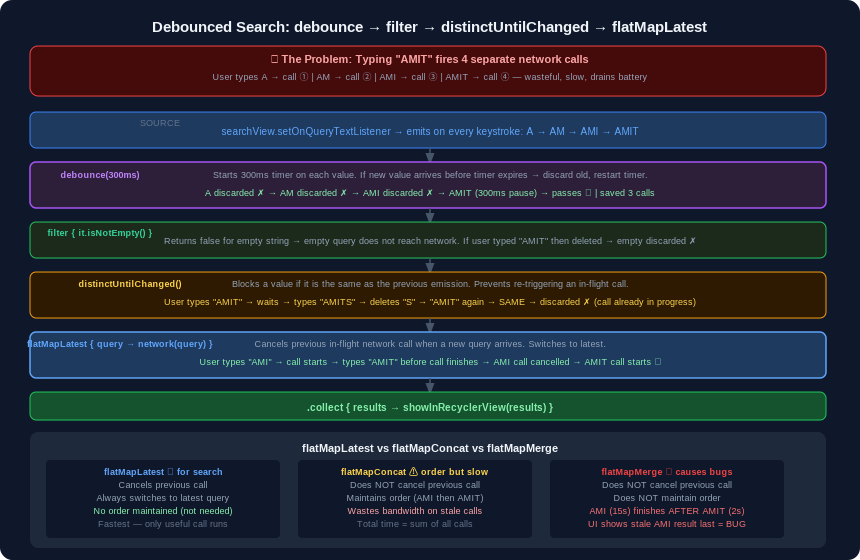
Search is the most common real-world example of Kotlin Flow operators in action. Without optimization, typing “AMIT” character by character fires four network calls — most of which are wasted. With four operators chained together, you reduce that to at most one call for the query the user actually cares about. Each operator solves exactly one problem.
The Problem
A search field emits a value on every keystroke. Typing “AMIT” produces:
A → AM → AMI → AMITA naive implementation fires a network call for each emission:
searchView.setOnQueryTextListener { query ->
    viewModelScope.launch {
        val results = api.search(query)   // called 4 times
        showResults(results)
    }
}
Four calls go out. Three of them (A, AM, AMI) are wasted because the user never stopped at those queries. On a slow network each call takes several seconds, and the results from stale calls can arrive after the relevant one — showing wrong data.
Flow operators fix this layer by layer.
Step 1 — debounce: Wait for the User to Pause
debounce(300) holds each value for 300 milliseconds. If a new value arrives before the timer expires, the old value is discarded and the timer resets. Only a value that survives a full 300 ms pause passes downstream.
queryFlow
    .debounce(300)   // wait for 300ms pause before passing downstream
Trace through “AMIT” typed quickly:
| Keystroke | Timer starts | Next key arrives | Result |
|---|---|---|---|
| A | 300ms | M arrives at ~80ms | A discarded ✗ |
| AM | 300ms | I arrives at ~90ms | AM discarded ✗ |
| AMI | 300ms | T arrives at ~100ms | AMI discarded ✗ |
| AMIT | 300ms | user pauses | AMIT passes ✅ |
Three calls avoided. The downstream only sees AMIT.
The 300 ms threshold comes from user research: the average human keystroke gap while typing is less than 300 ms. A pause longer than that usually means the user has finished their input.
Step 2 — filter: Drop Empty Queries
After debounce, add a filter to discard empty strings. Suppose the user types “AMIT” and then deletes all four characters. Debounce lets the empty string through (there is a pause after deleting). Without a filter, an empty string triggers a network call.
.debounce(300)
.filter { it.isNotEmpty() }   // empty query → false → not passed downstream
filter takes a predicate. If the predicate returns false, the value is silently dropped and never reaches the next operator.
Step 3 — distinctUntilChanged: Skip Duplicate Consecutive Queries
Consider this scenario: the user types “AMIT”, waits, then types an extra character “S” to get “AMITS”, then immediately deletes it, reverting to “AMIT” again. Debounce lets “AMIT” through a second time. Without distinctUntilChanged, a second call goes out for “AMIT” even though a call is already in progress for that exact query.
.debounce(300)
.filter { it.isNotEmpty() }
.distinctUntilChanged()   // skip if same as previous emission
distinctUntilChanged compares each emission to the one immediately before it. If they are equal, the new one is dropped. If the previous call for “AMIT” is still in flight and the same query arrives again, the in-flight call continues and no duplicate is fired.
Step 4 — flatMapLatest: Cancel Stale Calls
Even with debounce, there are cases where a call is already running when a new query arrives. The user pauses after “AMI” long enough for debounce to let it through. A network call starts for “AMI”. Before it finishes, the user resumes typing and reaches “AMIT”, which also passes debounce.
Without flatMapLatest, both calls run to completion. The “AMI” result could arrive after “AMIT” and overwrite the UI with stale data.
.debounce(300)
.filter { it.isNotEmpty() }
.distinctUntilChanged()
.flatMapLatest { query ->
    flow {
        val results = api.search(query)
        emit(results)
    }
    .catch { emitAll(flowOf(emptyList())) }   // handle individual call failure
}
flatMapLatest cancels the previously running inner Flow the moment a new query arrives. “Latest” in the name means it always switches to the most recent value. There is no need to maintain order because stale calls are cancelled — they will never produce output.
The Full Pipeline
searchQueryFlow                          // emits on every keystroke
    .debounce(300)                       // wait for pause
    .filter { it.isNotEmpty() }          // skip empty
    .distinctUntilChanged()              // skip duplicate consecutive
    .flatMapLatest { query ->            // cancel stale, run latest
        dataFromNetwork(query)
            .catch { emitAll(flowOf(emptyList())) }
    }
    .flowOn(Dispatchers.IO)
    .collect { results ->
        showInRecyclerView(results)
    }
Typing “AMIT” quickly → 0 calls for A, AM, AMI → 1 call for AMIT.
Typing “AMIT”, pausing, typing “AMI” → AMI call starts → typing “T” → AMIT replaces it → only AMIT result shown.
flatMapLatest vs flatMapConcat vs flatMapMerge
These three operators differ in two properties: whether they cancel the previous call and whether they maintain order.
| Operator | Cancels previous | Maintains order | Result for search |
|---|---|---|---|
flatMapLatest | ✅ Yes | N/A (cancelled) | Always shows latest query’s result ✅ |
flatMapConcat | ❌ No | ✅ Yes | All calls complete in order — slow and wasteful |
flatMapMerge | ❌ No | ❌ No | Causes silent bugs |
Why flatMapConcat is wrong for search
flatMapConcat runs calls in series and maintains order. If “AMI” takes 15 seconds and “AMIT” takes 2 seconds, the user waits 15 + 2 = 17 seconds for the “AMIT” result. The “AMI” call is not cancelled — it runs to completion even though no one needs it.
Why flatMapMerge causes bugs
flatMapMerge runs all calls in parallel but respects no ordering. If “AMI” (15 s) and “AMIT” (2 s) both run, “AMIT” finishes first and the UI shows its result. Then 13 seconds later “AMI” finishes and overwrites the UI with stale results for the old query. The user sees the wrong data with no error — a silent bug.
flatMapLatest avoids both problems: it cancels old calls immediately, so only the call for the most recent query ever produces output.
Real-World Use Cases for This Pattern
This exact pipeline — debounce, filter, distinctUntilChanged, flatMapLatest — applies anywhere continuous user input drives an async operation:
- Search bars (Amazon, YouTube, Flipkart-style type-ahead)
- Auto-complete / suggestion fields
- Live filtering of a large local dataset
- Real-time validation (check username availability as the user types)
Where Kotlin Flow Is Used in Android
Now that all the operators are in place, here is where Flow fits in a real Android codebase:
| Use case | Flow tool |
|---|---|
| Database changes updating UI automatically | Room DAO returning Flow<List<T>> |
| UI state management in ViewModel | StateFlow |
| One-time events (snackbar, navigation) | SharedFlow |
| Debounced search | debounce + flatMapLatest |
| Parallel API calls | zip |
| Serial API calls | flatMapConcat |
| Background work with thread switching | flowOn |
| Real-time streaming (WebSocket, GPS, sensors) | flow { emit() } with multiple emissions |
| Clean Architecture layers | Repository → UseCase → ViewModel each return Flow |
Flow vs RxJava
A brief note on why Kotlin Flow replaced RxJava in most Kotlin-first codebases:
RxJava solved callback hell — it turned deeply nested anonymous classes into clean functional chains. That was a genuine improvement. Kotlin Coroutines went further: code that looks synchronous but is actually asynchronous, with no callbacks at all. And crucially, Flow is part of the Kotlin standard library. You do not add a dependency. You do not increase APK size. Any Kotlin project already has the entire Flow and coroutines API available.
RxJava is still a valid choice for Java codebases or projects with existing RxJava investment. But for new Kotlin-first Android projects, Flow with coroutines is the native, zero-overhead default.
Summary
| Operator | Problem it solves |
|---|---|
debounce(300) | Discards intermediate keystrokes — only final query after a pause passes |
filter { it.isNotEmpty() } | Drops empty strings to avoid pointless network calls |
distinctUntilChanged() | Skips re-triggering a call for the same consecutive query |
flatMapLatest | Cancels in-flight call when a new query arrives — always switches to latest |
flatMapMerge | Avoid for search — causes silent stale-data bugs |
flatMapConcat | Avoid for search — wastes bandwidth and doubles total wait time |