
Changing the IP address in FusionPBX is not just a basic network operation — it directly impacts your entire VoIP ecosystem, including:
- SIP registrations
- RTP media flow
- FreeSWITCH SIP profiles
- Internal routing and domains
⚠️ If not done correctly, you may face:
- Phones failing to register
- One-way or no audio
- Call routing failures
This guide provides a safe and production-ready approach to changing your FusionPBX IP without breaking existing functionality.
🧠 Why Changing FusionPBX IP Requires Care
FusionPBX is built on top of FreeSWITCH, which binds SIP and RTP services to specific IP addresses.
When the IP changes:
- Existing SIP profiles may still reference the old IP ❌
- RTP streams may be sent to incorrect destinations ❌
- Internal domain routing may fail ❌
👉 That’s why a step-by-step, system-wide update is essential.
Step 1: Change OS Network IP Address
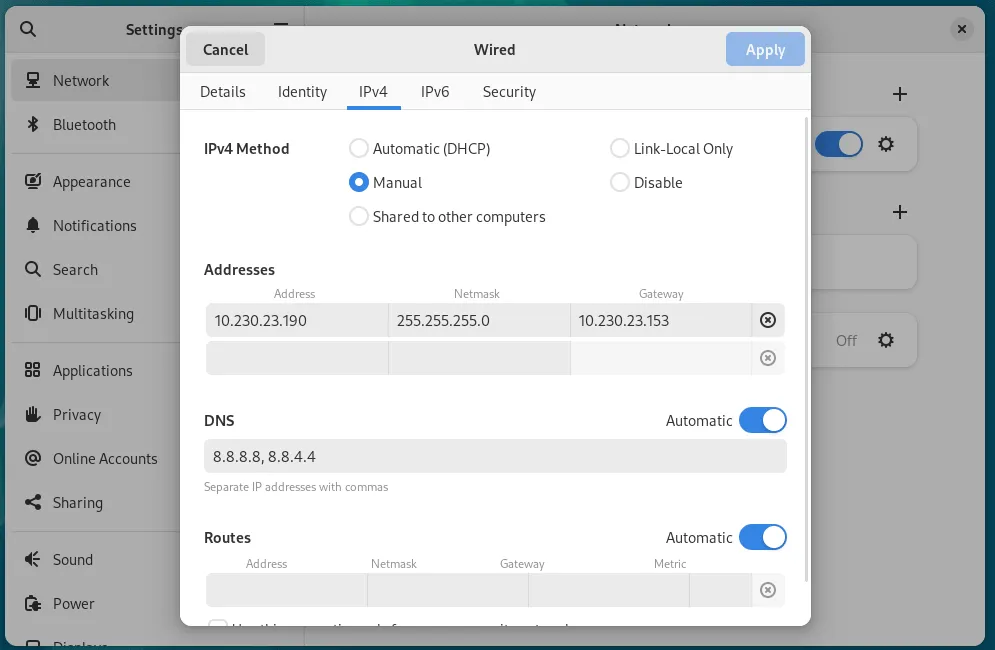
Change your network configuration as shown in the screenshot above. After making changes, restart the network manager and verify:
ip aStep 2: Update FusionPBX Domain
FusionPBX uses domains for internal SIP routing and device registration.
Login to FusionPBX UI:
Advanced → DomainsUpdate the following:
Domain Name / IP → 10.230.23.190💡 This ensures all SIP endpoints and dialplans reference the updated IP address.
Step 3: Restart VM or Clear Cache & Restart FreeSWITCH
After updating the IP and domain, you must reload system services.
You can either:
- Restart the virtual machine
OR
Clear FusionPBX cache manually:
rm -rf /var/cache/fusionpbx/*Then restart FreeSWITCH:
systemctl restart freeswitch🚀 This step is critical because FreeSWITCH caches configurations, including old IP references.
Step 4: Verify FreeSWITCH SIP Status
Access the FreeSWITCH CLI:
fs_cliThen run:
sofia statusExpected output:
freeswitch@fusionpbx> sofia status
                     Name	   Type	                                      Data	State
=================================================================================================
            external-ipv6	profile	  sip:mod_sofia@[2404:1c40:17f:9369:8de0:4b69:b34c:12a7]:5080	RUNNING (0)
                 external	profile	          sip:mod_sofia@10.230.23.190:5080	RUNNING (0)
            internal-ipv6	profile	  sip:mod_sofia@[2404:1c40:17f:9369:8de0:4b69:b34c:12a7]:5060	RUNNING (0)
                 internal	profile	          sip:mod_sofia@10.230.23.190:5060	RUNNING (0)
=================================================================================================
4 profiles 0 aliases
✅ Verify that:
- SIP profiles are RUNNING
- The new IP address is reflected correctly